
Prerequisites
-
Access to Assa Abloy CLIQ GUI.
-
Local programming device
-
Master programming key
-
Master programming key’s PIN
-
A certificate for accessing the GUI.
-
-
Web Service certificate and password.
-
Supported PACS versions: Requirements
Configuration
PACS Configuration
Turn ON Web Services
-
Go to CLIQ administration
-
Login with your Master Programming Key and PIN
-
Go to
Administration/System settings -
Click on
Editbutton at the bottom left corner. -
Make sure the
Web Services integrationis turnedON(checked). -
Click on
Savebutton at the bottom left corner.
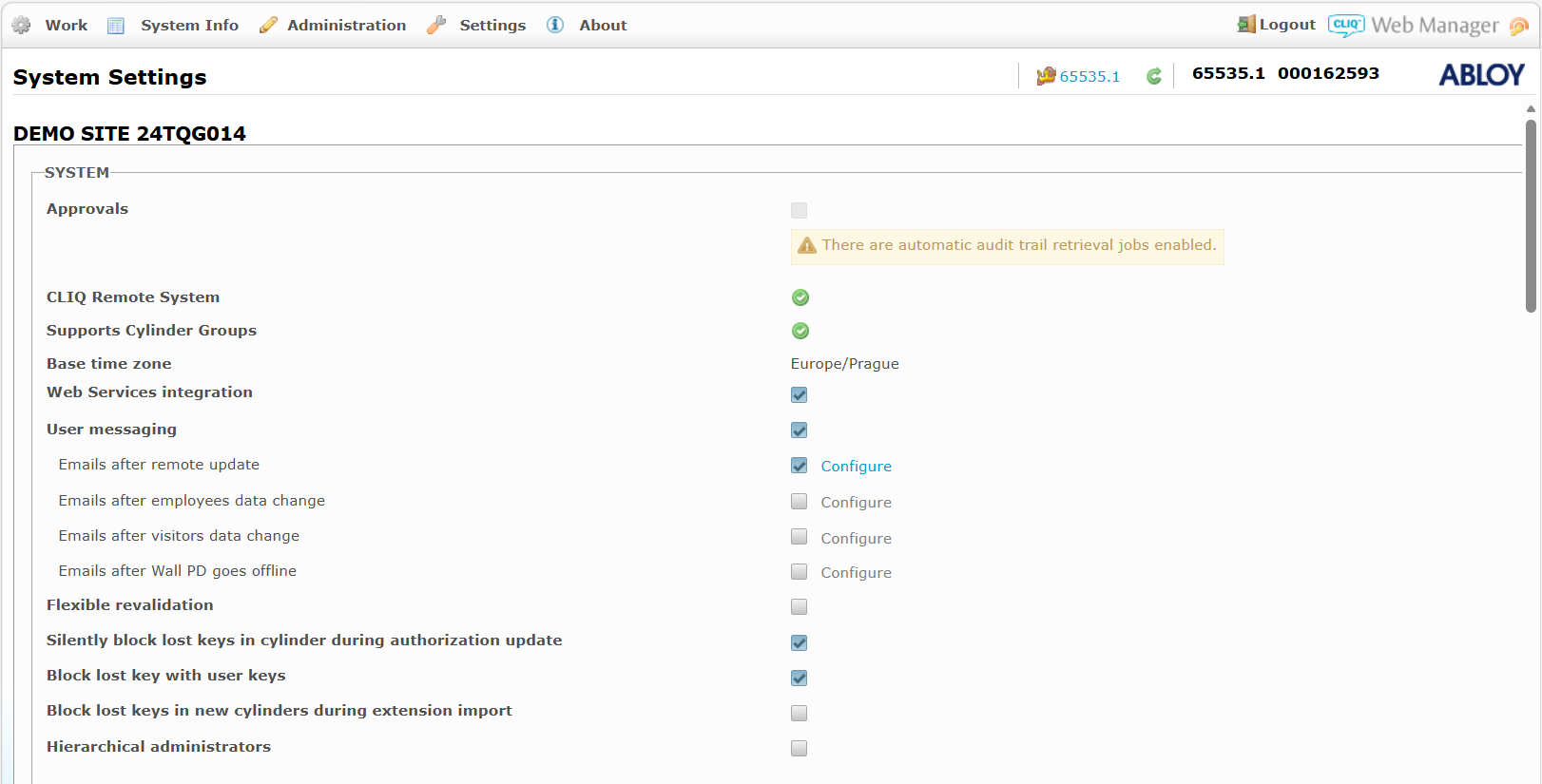
Accessing the CLIQ GUI administration requires installing of a certificate to your computer.
Please contact your company CLIQ administrator for setting this up.
Agent Configuration
General agent startup
{pacsd-name} = assa-abloy_cliq
Step 1: Download
To obtain the pacs-agent_{pacs-name} Docker image, follow the HID Agent Administration Guide for End-Customer.
Step 2: Create environment
Create a file named .env with the following content:
Agent__TenantId=example-tenant-id
Agent__PacsId=example-pacs-id
Auth__ClientId=your-client-id
Auth__ClientSecret=your-client-secret
In case you are connecting to a different environment than HID production, you need to set the proper URLs:
Auth__AuthNProvider=https://auth.example.com
Agent__PlatformUrl=https://platform.example.com
-
Adjust all file parameters according to your setup.
-
It is recommended to store this configuration on an encrypted drive or delete
.envfile as soon as the Docker image is executed.
Step 3: Run Docker image
docker run -d \
  --env-file .env \
  pacs-agent-{pacs-name}:latest
Step 4: Check that the Docker image is running
docker ps
Environment variables description
Related to HIS
-
Agent__PlatformUrl: HID Integration Service URL (https://his.hidglobal.com/ais/v1).-
This information is provided by HID. By default, this is set automatically to the production environment value and does not need to be set manually in most cases.
-
-
Agent__TenantId: Tenant ID within HID Integration Service.-
This information is provided by HID.
-
-
Agent__PacsId: Unique ID assigned to the agent during registration.-
This information is provided by HID.
-
If you registered your PACS on your own, this would be the
IDyou gave to the PACS.
-
Related to HID Authentication Service
-
Auth__AuthNProvider: HID Authentication Service URL (https://auth-us.api.hidglobal.com/idp/t89d23e0b2445510399335/authn).-
This information is provided by HID. By default, this is set automatically to the production environment value and does not need to be set manually in most cases.
-
-
Auth__ClientId: Client ID obtained during registration.-
This information is provided by HID.
-
-
Auth__ClientSecret: Client secret obtained during registration.-
This information is provided by HID.
-
Don't forget to replace the {pacs-name} placeholders with the actual name of the pact agent.
Agent-specific configuration
Environment variables for CLIQ:
-
Cliq__Url: CLIQ web service URL e.g. https://x.assaabloy.com:8989/ -
Cliq__CertificatePath: A certificate related withCliq__Url. It’s provided by Assa Abloy. E.g.C:\\Certificates\2-x-WebService.p12. -
Cliq__CertificateBase64: (Optional) This option replace theCliq__CertificatePath. The certificate can be placed here as a string in Base64 format. E.g.MIACAQMw…jdSoA4EqzmECAwGQAAAA. -
Cliq__CertificatePassword: A password related with theCliq__CertificatePath/Cliq__CertificateBase64.
Please contact Assa Abloy CLIQ support if you have no certificate yet.
The Agent supports reading a certificate from a file (Cliq__CertificatePath) or an inline certificate in Base64 format (Cliq__CertificateBase64).
Agent-specific .env file part example:
Cliq__Url=<URL>
Cliq__CertificateBase64=<certificate-in-base64>
Cliq__CertificatePassword=<certificate-password>
Limitations
-
The agent supports Access Units management. To use the key with offline devices, a physical key must be programmed - this action is not available through the agent. It must be done manually through the Assa Abloy CLIQ GUI.
-
Writing data to CLIQ can take time to sync. Subsequent edits to the same entity may behave unexpectedly.
-
Identity/Visitor Picture is not supported by the PACS.
-
Events from offline devices are not reported immediately. The PACS gathers this information once the device (like a Key) reaches another online device.
-
Custom extension fields are not supported by PACS.
-
Master keys are not shared through the Agent. If a master key is assigned to a person, you cannot remove that person or the credential.
Unsupported operations
-
All PIN first-factor operations for Identities and Visitors.
-
Identity Activation and Deactivation are not supported by the PACS. Identities are always Active.
-
Visitor Check In and Check Out are not supported by the PACS. Visitors are always Active.
-
ListAccessUnitIdentities
-
ListAccessUnitVisits
-
Events Writing to the PACS
-
Identity Credential Activation and Deactivation are not supported by the PACS. Credentials are always Active.
-
Visit Credential Activation and Deactivation are not supported by the PACS. Credentials are always Active.
Limited operation
|
Operation |
Note |
|---|---|
|
|
Not supported. |
|
|
Every credential creation in the CLIQ agent requires a Works only with CardCodes registered in the CLIQ system. The CardCode is the secondary key marking, e.g., XK8012. |
|
|
No Picture support, the feature is not supported by the PACS. |
Naming Mapping
Entities
|
AIS Entity Name |
PACS GUI Term |
|---|---|
|
Identity |
Person (type: Employee) |
|
Visit |
Person (type: Visitor) |
|
Card Format |
Static information |
|
Identity Credential |
Key |
|
Visit Credential |
Key |
|
Access Unit |
Access Profile |
|
Identity Access |
Access Profile |
|
Visit Access |
Access Profile |
Operations
N/A
Creation of extension fields
Extension fields are not supported.
Supported entities and data types
List of Entities Supporting Extension Fields (Relevant to AIS)
|
Entity |
Supports EFs |
|---|---|
|
Identity |
No |
|
Visit |
No |
|
Credential |
No |
|
Access Unit |
No |
List of Supported Data Types for Extension Fields
|
Variable type (AIS) |
Variable type (CLIQ) |
|---|---|
|
Boolean |
N/A |
|
Integer |
N/A |
|
Decimal |
N/A |
|
String |
N/A |
|
DateTime |
N/A |