
Prerequisites
-
This document describes all supported versions of the agent.
-
Supported PACS versions: Requirements
-
A SiPass Operator is required to make all settings mentioned in this document.
-
The Agent also needs to have an Operator for access the SiPass API.
-
The Agent also needs to have a connection string for access the SiPass SQL Database.
Configuration
PACS Configuration
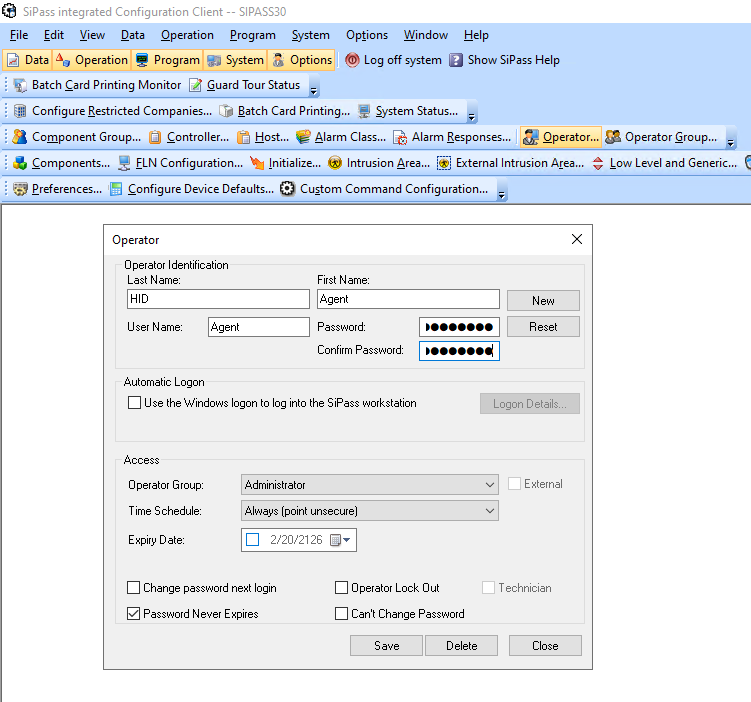
Creating the technical user
-
Open
SiPass integrated Configuration Clientapplication. -
Click on
Operatorbutton and create a new one -
The
User NameandPasswordis needed for the Agent. -
Keep the
Time Scheduleset toAlways. -
Check the
Password Never Expires. -
Click on
Savebutton.
Workgroup - Identity
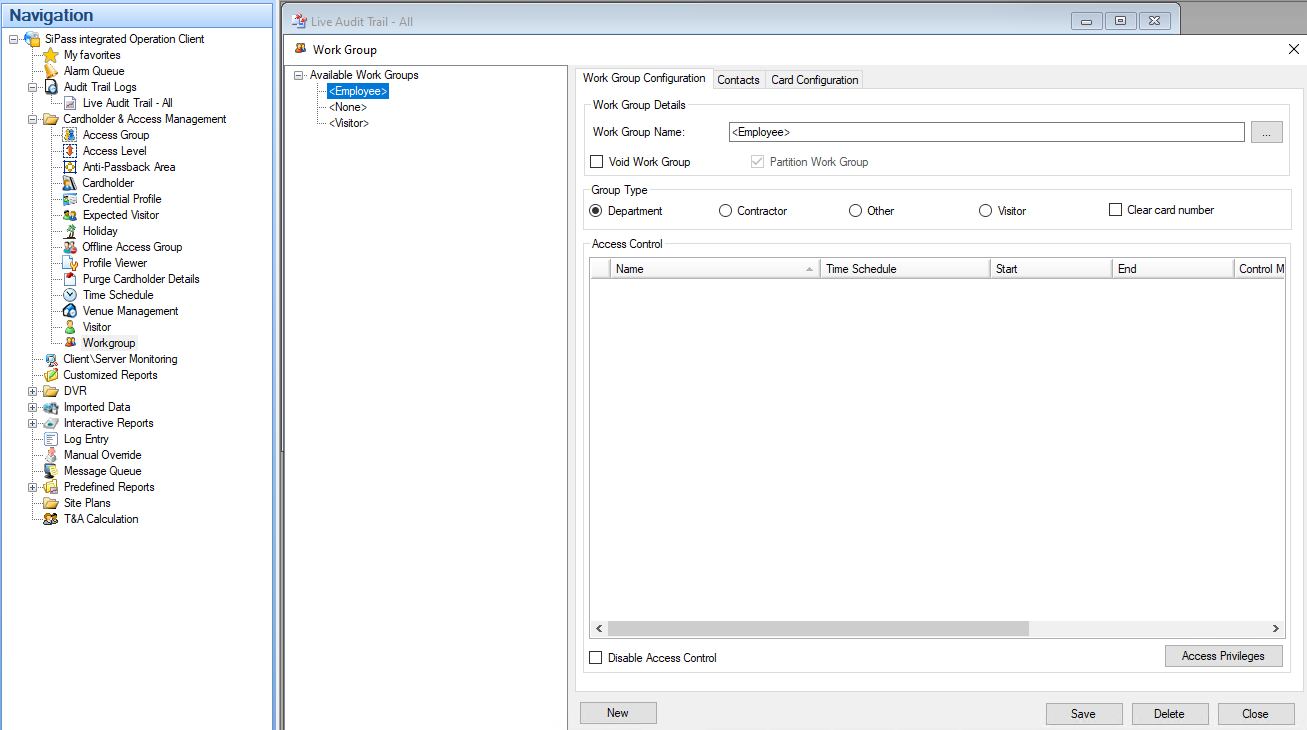
The agent needs to know a workgroup for Identity.
-
Go to
SiPass integrated Operation Clientapp. -
Go to
Cardholder & Access management/Workgroup. -
Makes sure a workgroup for an Identity exists

Workgroup - Visit
The agent needs to know a workgroup for Visit.
-
Go to
SiPass integrated Operation Clientapp. -
Go to
Cardholder & Access management/Workgroup. -
Makes sure a workgroup for an Visit exists
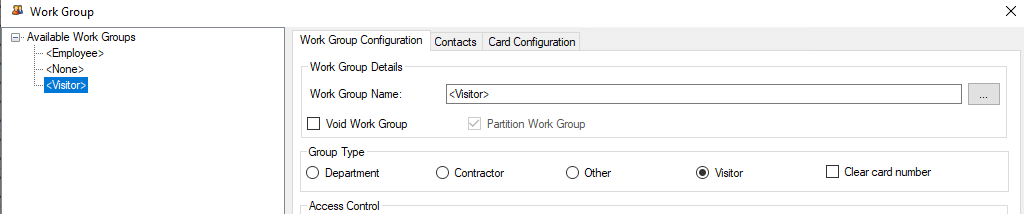
Workgroup names do not need to follow any specific naming convention. The only requirement is that each workgroup name must be unique.
Once the workgroups are defined, set their names in the agent configuration.
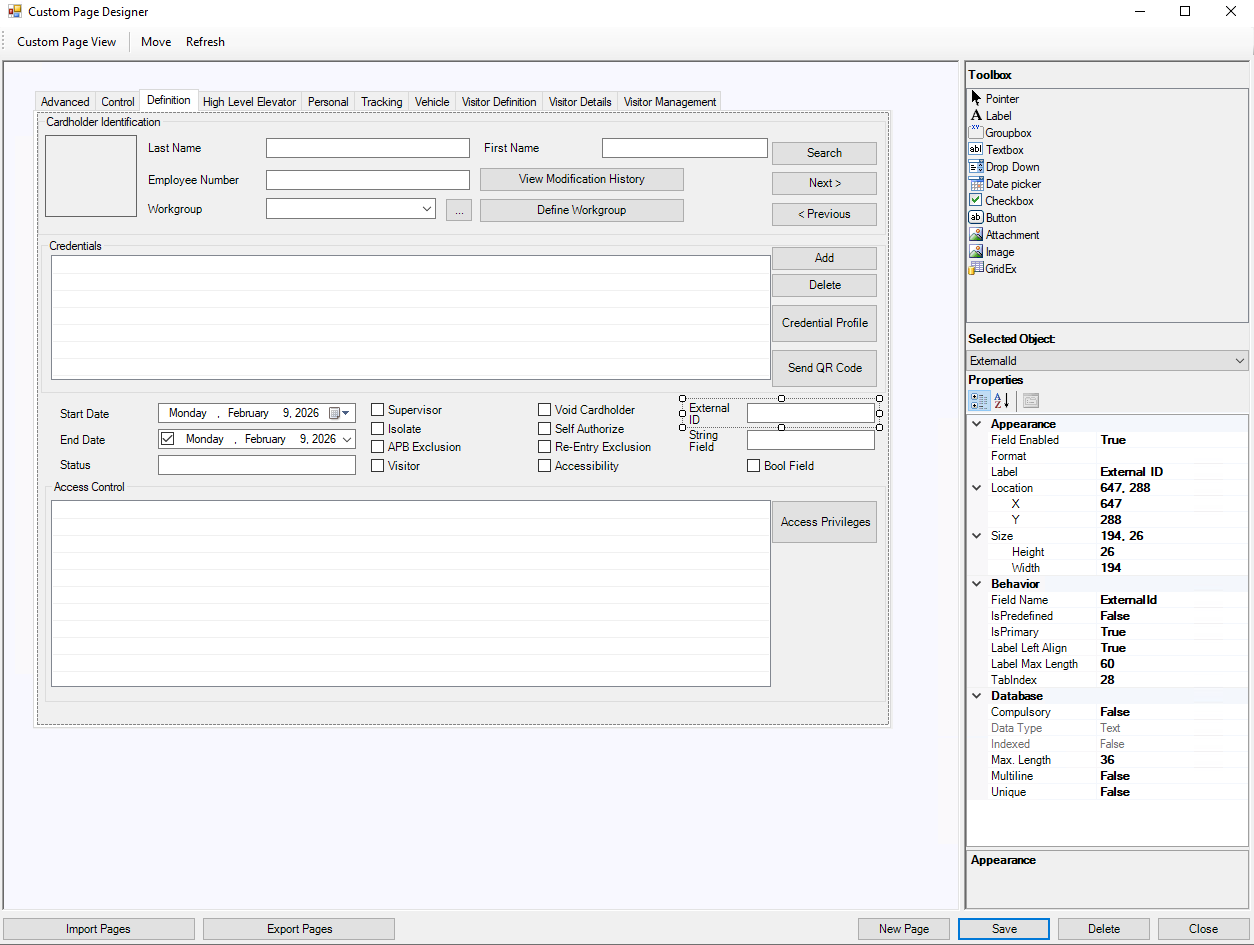
Creating technical custom fields - Identity
-
Open
SiPass integrated Configuration Clientapplication. -
Click on
Custom Page Designer. -
Go to
Definitionand add a newTextboxsomewhere.-
Set
Labelto e.g.External ID. -
Set
Field Nameto e.g.ExternalId(without spaces). This value should be added in the Agent configuration. -
Database.Max Lengthshould be set to36.
-
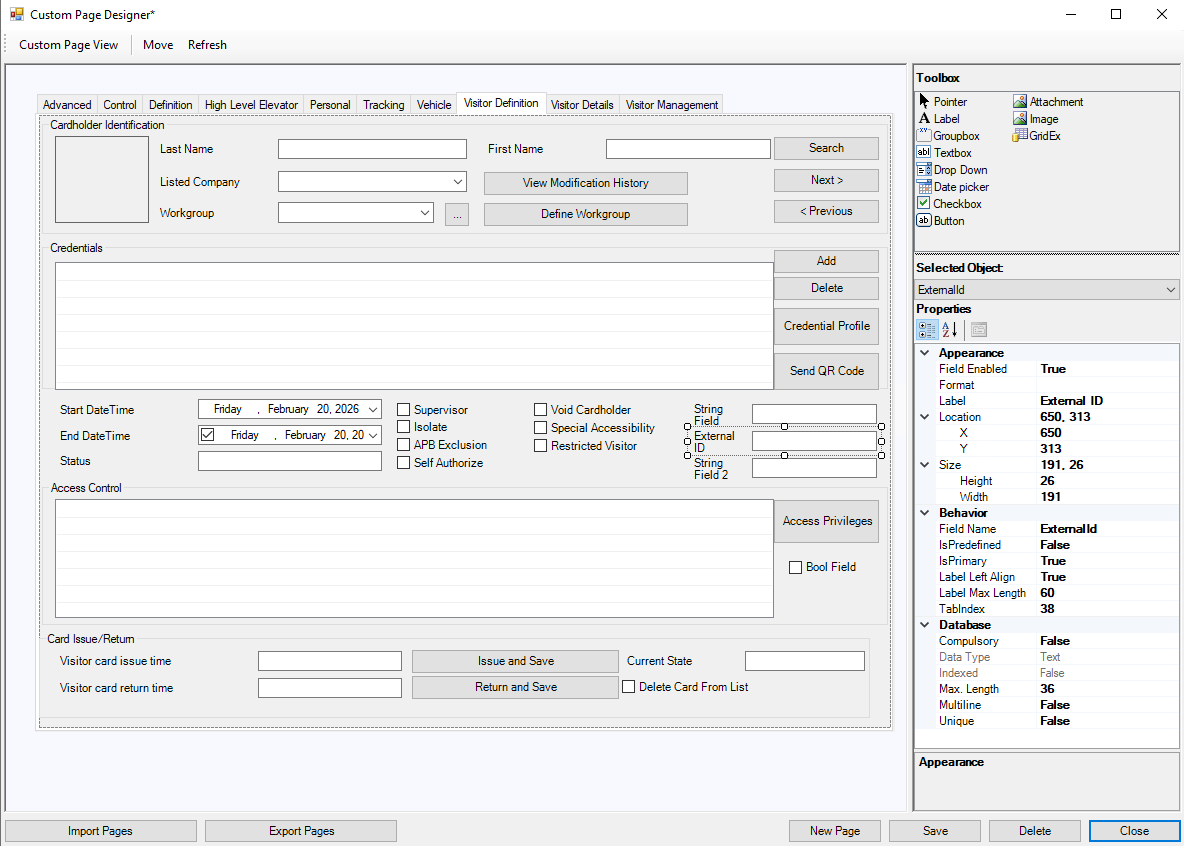
Creating technical custom fields - Visit
-
Open
SiPass integrated Configuration Clientapplication. -
Click on
Custom Page Designer. -
Go to
Visitor Definitionand add a newTextboxsomewhere.-
Set
Labelto e.g.External ID. -
Set
Field Nameto e.g.ExternalId(should be same as for the Identity). -
Database.Max Lengthshould be set to36.
-
PIN as a Credential support
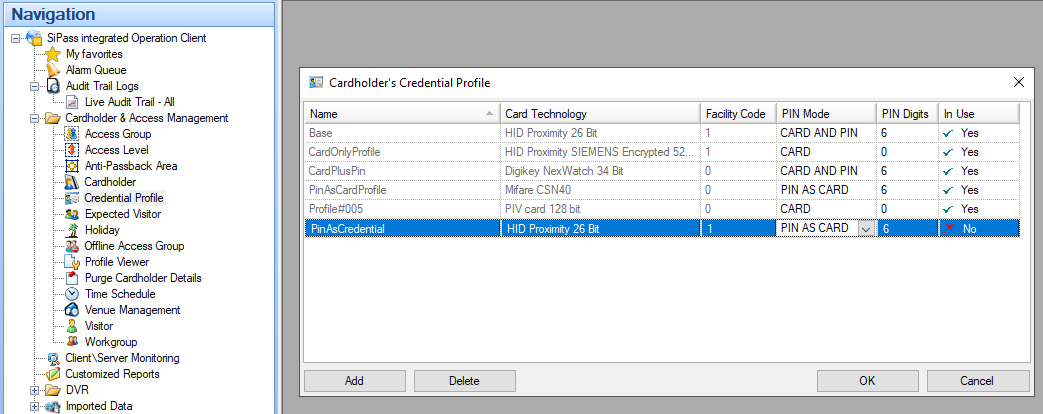
The Agent supports PIN as Credential. The Agent needs to know a Credential Profile which should be used for PIN management.
-
Go to
SiPass integrated Operation Clientapp. -
Go to
Cardholder & Access management/Credential Profile. -
Find an existing Profile with
PIN Mode:PIN AS CARDor create a new one. -
Please add the
Nameinto the Agent configuration.
SiPass API limit
By default, SiPass sets the maximum API request limit to 100 requests per minute. We recommend increasing this limit.
-
Open a file
Siemens.SiPass.HR.API.Host.exe.Configlocated in SiPass installation in a Text editor.
For example:
C:\Program Files (x86)\SiPass integrated\HR API\SiPass integrated HR API\Siemens.SiPass.HR.API.Host.exe.Config.
Please, keep it mind that your location could be different.
-
Find a line with
RateLimit_RequestCount. It looks like:XML<add key="RateLimit_RequestCount" value="100" /> -
Change the value to
100000. Like:XML<add key="RateLimit_RequestCount" value="100000" /> -
Save the file.
-
Restart the SiPass.
Agent Configuration
General agent startup
Step 1: Download
To obtain the pacs-agent_{pacs-name} Docker image, follow the HID Agent Administration Guide for End-Customer.
Step 2: Create environment
Create a file named .env with the following content:
Agent__TenantId=example-tenant-id
Agent__PacsId=example-pacs-id
Auth__ClientId=your-client-id
Auth__ClientSecret=your-client-secret
In case you are connecting to a different environment than HID production, you need to set the proper URLs:
Auth__AuthNProvider=https://auth.example.com
Agent__PlatformUrl=https://platform.example.com
-
Adjust all file parameters according to your setup.
-
It is recommended to store this configuration on an encrypted drive or delete
.envfile as soon as the Docker image is executed.
Step 3: Run Docker image
docker run -d \
  --env-file .env \
  pacs-agent-{pacs-name}:latest
Step 4: Check that the Docker image is running
docker ps
Environment variables description
Related to HIS
-
Agent__PlatformUrl: HID Integration Service URL (https://his.hidglobal.com/ais/v1).-
This information is provided by HID. By default, this is set automatically to the production environment value and does not need to be set manually in most cases.
-
-
Agent__TenantId: Tenant ID within HID Integration Service.-
This information is provided by HID.
-
-
Agent__PacsId: Unique ID assigned to the agent during registration.-
This information is provided by HID.
-
If you registered your PACS on your own, this would be the
IDyou gave to the PACS.
-
Related to HID Authentication Service
-
Auth__AuthNProvider: HID Authentication Service URL (https://auth-us.api.hidglobal.com/idp/t89d23e0b2445510399335/authn).-
This information is provided by HID. By default, this is set automatically to the production environment value and does not need to be set manually in most cases.
-
-
Auth__ClientId: Client ID obtained during registration.-
This information is provided by HID.
-
-
Auth__ClientSecret: Client secret obtained during registration.-
This information is provided by HID.
-
Don't forget to replace the {pacs-name} placeholders with the actual name of the pact agent.
Agent-specific configuration
{pacs-name} = siemens_sipass-integrated
Environment variables for SiPass:
-
SiPass__Api__ServiceHrUrl: IP address or domain of SiPass integrated. E.g., https://10.154.52.188:8745/ -
SiPass__Api__ServiceManagementUrl: IP address or domain of SiPass integrated. E.g., https://10.154.52.188:8744/ -
SiPass__Api__UserName: Technical user’s username from creating the technical user. -
SiPass__Api__Password: Password for the username above. -
SiPass__Api__ClientId: A random string. E.g.Agent -
SiPass__Api__HrEventMessageSubscriptionTypes: List of Event Type IDs which Agent should be listening to separated by;. E.g.1;3;6. The list of available IDs. -
SiPass__Api__ManagementEventMessageSubscriptionTypes: List of Event Type IDs which Agent should be listening to separated by;. E.g.0;1. The list of available IDs. -
SiPass__Api__TimeZone: SiPass API’s time zone if it’s different than Agent is located into. The default value is the local time zone. The list of available time zones. UseID. E.g.Pacific Standard Time. -
SiPass__Db__ConnectionString: Replace10.154.52.188by URL of the database server.userandpasswordby a user with read rights to the SiPass database.
E.g.Data Source=10.154.52.188;Persist Security Info=True;User ID=user;Password=password;Pooling=False;MultipleActiveResultSets=False;Encrypt=False;TrustServerCertificate=False;Application Name="SQL Server Management Studio";Command Timeout=0
This configuration is optional. However, not providing the DB connection has the following implications:
-
The “Find by external ID” operation will run more slowly and less reliably.
-
The “Get identities/visitors for access unit” operation will not be available.
-
SiPass__Fields__ExternalIdFieldKey: The value is the Field Name from Identity Custom Field. E.g.ExternalId. -
SiPass__Fields__IdentityWorkgroupKey: Set the value from Workgroup - Identity. E.g.<Employee> -
SiPass__Fields__VisitWorkgroupKey: Set the value from Workgroup - Visit. E.g.<Visitor> -
SiPass__Fields__PinAsCardCredentialProfileName: Set theNameof aPIN AS CARDCredential Profile. E.g.PinAsCredential. -
SiPass__Fields__ActivateUserForDays: The default value how long is an Identity or Visit active in days. Use e.g.365for a year. -
SiPass__Fields__DefaultPicture: (Optional - the agent has a default picture set up already) The default cardholder picture is used as a placeholder when AIS deletes an existing photo. Since SiPass does not support deleting a cardholder picture directly, the agent replaces the current picture with this placeholder instead. A Base 64 String should be used, e.g./9j/4AAQSkZJRgABAgAAYABgAAD//gAcQ3JlYXRlZCBieSBBY2N1U29mdCBDb3JwLgD/wAARCABgAGADASIAAhEBAxEB...
Agent-specific .env file part example:
SiPass__Api__ServiceHrUrl=<link-to-hr-api>
SiPass__Api__ServiceManagementUrl=<link-to-management-api>
SiPass__Api__UserName=<user-name>
SiPass__Api__Password=<password>
SiPass__Api__ClientId=<client_id>
SiPass__Api__HrEventMessageSubscriptionTypes=<list-hr-event-type-ids>
SiPass__Api__ManagementEventMessageSubscriptionTypes=<list-management-event-type-ids>
SiPass__Api__TimeZone=<time-zone>
SiPass__Db__ConnectionString=<db-connection-string>
SiPass__Fields__ExternalIdFieldKey=<external-id-field-name>
SiPass__Fields__IdentityWorkgroupKey=<identity-workgroup-name>
SiPass__Fields__VisitWorkgroupKey=<visit-workgroup-name>
SiPass__Fields__PinAsCardCredentialProfileName=<pin-as-card-credential-profile-name>
SiPass__Fields__ActivateUserForDays=<activation-length-in-days>
SiPass__Fields__DefaultPicture=<base64-picture>
Self signed HTTP SSL certificate
The Agent supports self signed (un-trusted) SSL certificate.
Agent-specific .env file can be extended by this part for example:
-
Add the self signed SSL certificate fingerprint:
SiPass__Api__SslCertificateFingerprintSha256=<certificate-fingerprint> -
Ignore the SSL certificate completely.
SiPass__Api__TurnOffSslVerification=true
Option 2 (ignore the SSL certificate) is not recommended in production.
SSL/TLS encryption is still used, but the agent will accept any server certificate, including invalid or untrusted ones.
Limitations
-
Extension fields have to be created manually; please see the extension field setup.
-
Each Credential Profile supports one related Credential per user Identity/Visit only.
-
An Identity/Visit is linked to a Workgroup. The Workgroup determines which Access Units its members can access. All Identities assigned to the Workgroup automatically inherit these permissions. Note that inherited permissions are not shown directly in the Access Unit interface.
-
Picture cannot be removed in the Update Identity/Visitor. A default picture is used instead.
Unsupported operations
-
Events Writing to the PACS
Limited operation
|
Operation |
Note |
|---|---|
|
|
Each credential is linked to a credential profile. An identity or visit can have only one credential per credential profile (AIS Format). |
|
|
SiPass supports multiple PINs if each PIN Credential has a different Credential Profile. AIS supports just one. |
|
|
Without a configured database, performance is very slow, especially with a higher number of identities and visits, due to the inability to search by externalId via the PACS API. |
|
|
This is available only when a database is configured. |
|
|
Visit |
|
|
Facility ID is resent to SiPass but some Credential Types take the Facility ID from a related Credential Profile instead. |
|
|
The extension fields for identity credentials and visit credentials are not supported. Provides the self (native fields) only. |
|
|
The extension fields for identity PINs and visit PINs are not supported. Self (native fields) can be mapped to PIN extension fields in AIS, but their values cannot be edited. |
|
|
|
Naming Mapping
Entities
|
AIS Entity Name |
PACS GUI Term |
|---|---|
|
Identity |
Cardholder (workgroup: Employee) |
|
Visit |
Cardholder (workgroup: Visitor) |
|
Card Format |
Credential Profile |
|
Identity Credential |
Credential |
|
Visit Credential |
Credential |
|
Access Unit |
Access Group |
|
Identity Access |
Access Rule |
|
Visit Access |
Access Rule |
Operations
|
AIS Entity Operation |
PACS GUI Term |
|---|---|
|
Activate |
Set the |
|
Deactivate |
Set the |
|
Check-in |
Set the |
|
Check-out |
Set the |
Creation of extension fields
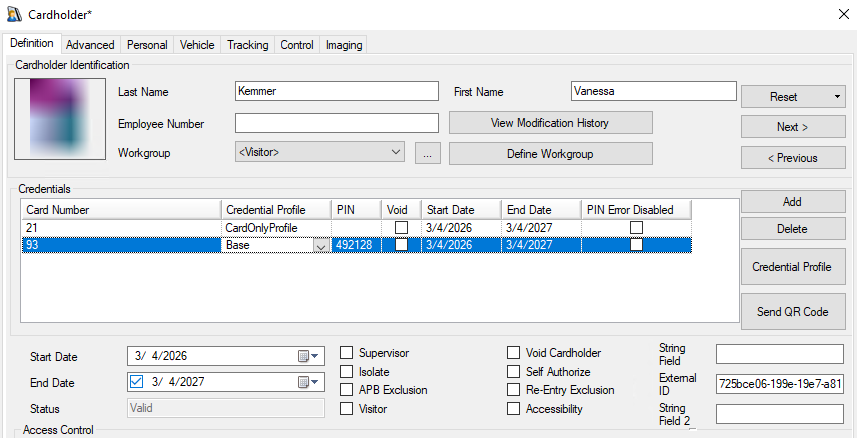
Manual for Creating an EF in the PACS - Identity
-
Open
SiPass integrated Configuration Clientapplication. -
Click on
Custom Page Designer. -
Go to
Definitionand add a newTextboxsomewhere.-
Set
Labelto a user friendly name. -
Set
Field Nameas identifier (without spaces). -
Set
Database.Max Lengthto a correct value to correspond with your values.
-
-
Click on the Save button.
Manual for Creating an EF in the PACS - Visit
-
Open
SiPass integrated Configuration Clientapplication. -
Click on
Custom Page Designer. -
Go to
Visitor Definitionand add a newTextboxsomewhere.-
Set
Labelto a user friendly name. -
Set
Field Nameas identifier (without spaces). -
Set
Database.Max Lengthto a correct value to correspond with your values.
-
Supported entities and data types
List of Entities Supporting Extension Fields (Relevant to AIS)
|
Entity |
Supports EFs |
|---|---|
|
Identity |
Yes |
|
Visit |
Yes |
|
Credential |
No |
|
Access Unit |
No |
List of Supported Data Types for Extension Fields
|
Variable type (AIS) |
Variable type (SiPass) |
|---|---|
|
Boolean |
CheckBox |
|
Integer |
Numeric type of |
|
Decimal |
Emulated (Textbox) |
|
String |
TextBox |
|
DateTime |
Emulated (Textbox) |
Additional information
Hr Event Message Subscription Types
|
Enumeration |
Id |
|
EmployeeEvents |
1 |
|
EmployeeAccessPolicyEvents |
2 |
|
EmployeeWorkgroupsEvents |
3 |
|
EmployeeCredentialEvents |
4 |
|
WorkgroupEvents |
5 |
|
WorkgroupAccessPolicyEvents |
6 |
|
VenueEvents |
7 |
|
VenueAccessPolicyEvents |
8 |
Management Event Message Subscription Types
|
Enumeration |
Id |
|
Event |
0 |
|
Alarm |
1 |
|
SubscriptionEvent |
2 |
Time Zones
|
ID |
Name |
|---|---|
|
Morocco Standard Time |
(GMT) Casablanca |
|
GMT Standard Time |
(GMT) Greenwich Mean Time : Dublin, Edinburgh, Lisbon, London |
|
Greenwich Standard Time |
(GMT) Monrovia, Reykjavik |
|
W. Europe Standard Time |
(GMT+01:00) Amsterdam, Berlin, Bern, Rome, Stockholm, Vienna |
|
Central Europe Standard Time |
(GMT+01:00) Belgrade, Bratislava, Budapest, Ljubljana, Prague |
|
Romance Standard Time |
(GMT+01:00) Brussels, Copenhagen, Madrid, Paris |
|
Central European Standard Time |
(GMT+01:00) Sarajevo, Skopje, Warsaw, Zagreb |
|
W. Central Africa Standard Time |
(GMT+01:00) West Central Africa |
|
Jordan Standard Time |
(GMT+02:00) Amman |
|
GTB Standard Time |
(GMT+02:00) Athens, Bucharest, Istanbul |
|
Middle East Standard Time |
(GMT+02:00) Beirut |
|
Egypt Standard Time |
(GMT+02:00) Cairo |
|
South Africa Standard Time |
(GMT+02:00) Harare, Pretoria |
|
FLE Standard Time |
(GMT+02:00) Helsinki, Kyiv, Riga, Sofia, Tallinn, Vilnius |
|
Israel Standard Time |
(GMT+02:00) Jerusalem |
|
E. Europe Standard Time |
(GMT+02:00) Minsk |
|
Namibia Standard Time |
(GMT+02:00) Windhoek |
|
Arabic Standard Time |
(GMT+03:00) Baghdad |
|
Arab Standard Time |
(GMT+03:00) Kuwait, Riyadh |
|
Russian Standard Time |
(GMT+03:00) Moscow, St. Petersburg, Volgograd |
|
E. Africa Standard Time |
(GMT+03:00) Nairobi |
|
Georgian Standard Time |
(GMT+03:00) Tbilisi |
|
Iran Standard Time |
(GMT+03:30) Tehran |
|
Arabian Standard Time |
(GMT+04:00) Abu Dhabi, Muscat |
|
Azerbaijan Standard Time |
(GMT+04:00) Baku |
|
Mauritius Standard Time |
(GMT+04:00) Port Louis |
|
Caucasus Standard Time |
(GMT+04:00) Yerevan |
|
Afghanistan Standard Time |
(GMT+04:30) Kabul |
|
Ekaterinburg Standard Time |
(GMT+05:00) Ekaterinburg |
|
Pakistan Standard Time |
(GMT+05:00) Islamabad, Karachi |
|
West Asia Standard Time |
(GMT+05:00) Tashkent |
|
India Standard Time |
(GMT+05:30) Chennai, Kolkata, Mumbai, New Delhi |
|
Sri Lanka Standard Time |
(GMT+05:30) Sri Jayawardenepura |
|
Nepal Standard Time |
(GMT+05:45) Kathmandu |
|
N. Central Asia Standard Time |
(GMT+06:00) Almaty, Novosibirsk |
|
Central Asia Standard Time |
(GMT+06:00) Astana, Dhaka |
|
Myanmar Standard Time |
(GMT+06:30) Yangon (Rangoon) |
|
SE Asia Standard Time |
(GMT+07:00) Bangkok, Hanoi, Jakarta |
|
North Asia Standard Time |
(GMT+07:00) Krasnoyarsk |
|
China Standard Time |
(GMT+08:00) Beijing, Chongqing, Hong Kong, Urumqi |
|
North Asia East Standard Time |
(GMT+08:00) Irkutsk, Ulaan Bataar |
|
Singapore Standard Time |
(GMT+08:00) Kuala Lumpur, Singapore |
|
W. Australia Standard Time |
(GMT+08:00) Perth |
|
Taipei Standard Time |
(GMT+08:00) Taipei |
|
Tokyo Standard Time |
(GMT+09:00) Osaka, Sapporo, Tokyo |
|
Korea Standard Time |
(GMT+09:00) Seoul |
|
Yakutsk Standard Time |
(GMT+09:00) Yakutsk |
|
Cen. Australia Standard Time |
(GMT+09:30) Adelaide |
|
AUS Central Standard Time |
(GMT+09:30) Darwin |
|
E. Australia Standard Time |
(GMT+10:00) Brisbane |
|
AUS Eastern Standard Time |
(GMT+10:00) Canberra, Melbourne, Sydney |
|
West Pacific Standard Time |
(GMT+10:00) Guam, Port Moresby |
|
Tasmania Standard Time |
(GMT+10:00) Hobart |
|
Vladivostok Standard Time |
(GMT+10:00) Vladivostok |
|
Central Pacific Standard Time |
(GMT+11:00) Magadan, Solomon Is., New Caledonia |
|
New Zealand Standard Time |
(GMT+12:00) Auckland, Wellington |
|
Fiji Standard Time |
(GMT+12:00) Fiji, Kamchatka, Marshall Is. |
|
Tonga Standard Time |
(GMT+13:00) Nuku'alofa |
|
Azores Standard Time |
(GMT-01:00) Azores |
|
Cape Verde Standard Time |
(GMT-01:00) Cape Verde Is. |
|
Mid-Atlantic Standard Time |
(GMT-02:00) Mid-Atlantic |
|
E. South America Standard Time |
(GMT-03:00) Brasilia |
|
Argentina Standard Time |
(GMT-03:00) Buenos Aires |
|
SA Eastern Standard Time |
(GMT-03:00) Georgetown |
|
Greenland Standard Time |
(GMT-03:00) Greenland |
|
Montevideo Standard Time |
(GMT-03:00) Montevideo |
|
Newfoundland Standard Time |
(GMT-03:30) Newfoundland |
|
Atlantic Standard Time |
(GMT-04:00) Atlantic Time (Canada) |
|
SA Western Standard Time |
(GMT-04:00) La Paz |
|
Central Brazilian Standard Time |
(GMT-04:00) Manaus |
|
Pacific SA Standard Time |
(GMT-04:00) Santiago |
|
Venezuela Standard Time |
(GMT-04:30) Caracas |
|
SA Pacific Standard Time |
(GMT-05:00) Bogota, Lima, Quito, Rio Branco |
|
Eastern Standard Time |
(GMT-05:00) Eastern Time (US & Canada) |
|
US Eastern Standard Time |
(GMT-05:00) Indiana (East) |
|
Central America Standard Time |
(GMT-06:00) Central America |
|
Central Standard Time |
(GMT-06:00) Central Time (US & Canada) |
|
Central Standard Time (Mexico) |
(GMT-06:00) Guadalajara, Mexico City, Monterrey |
|
Canada Central Standard Time |
(GMT-06:00) Saskatchewan |
|
US Mountain Standard Time |
(GMT-07:00) Arizona |
|
Mountain Standard Time (Mexico) |
(GMT-07:00) Chihuahua, La Paz, Mazatlan |
|
Mountain Standard Time |
(GMT-07:00) Mountain Time (US & Canada) |
|
Pacific Standard Time |
(GMT-08:00) Pacific Time (US & Canada) |
|
Pacific Standard Time (Mexico) |
(GMT-08:00) Tijuana, Baja California |
|
Alaskan Standard Time |
(GMT-09:00) Alaska |
|
Hawaiian Standard Time |
(GMT-10:00) Hawaii |
|
Samoa Standard Time |
(GMT-11:00) Midway Island, Samoa |
|
Dateline Standard Time |
(GMT-12:00) International Date Line West |