
Prerequisites
Required Software
-
NetBox PACS (see the Changelog and Requirements for compatibility)
Required Licenses
-
Ensure that the PACS has the required licenses enabled for the features the agent will use.
-
Examples: Cardholders, Partitions, NetBox module
-
Check the PACS UI for available licenses and any limits.
-
Required Permissions for Technical User
-
A NetBox user with full system setup privileges is required to make all the settings mentioned in this document.
-
The agent also needs a technical user account with full system setup privileges.
-
See section HIS LenelS2 NetBox Agent | Creating the Technical User for details on creating this user.
It is recommended to have a separate user for the agent.
Permissions
The technical user must have the following permissions:
-
Full system privileges for agent integration
-
Full access to Person records
-
Credential management permissions
-
Access Level configuration permissions
-
Permission to configure system settings and custom fields
Configuration
PACS Configuration
Creating the Technical User
-
Log in to PACS as an administrator
-
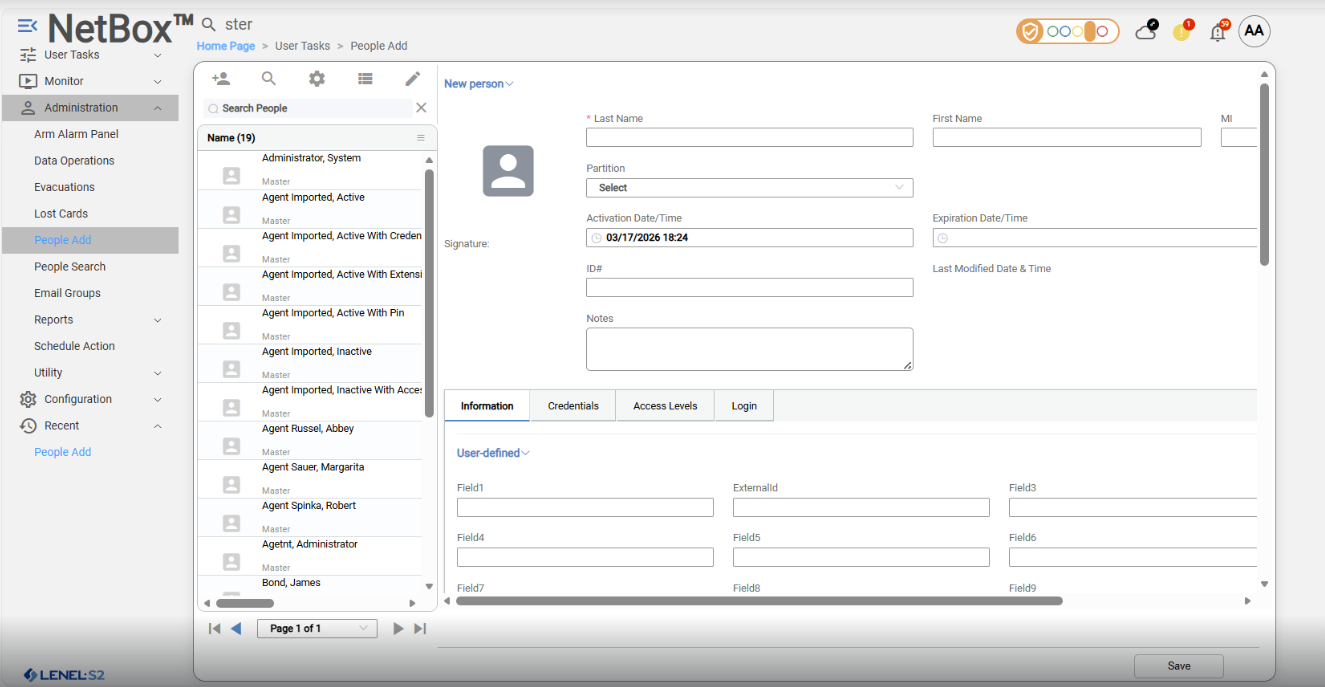
Navigate to: Administration → People Add
-
Fill in the following data:
-
First Name
-
Last Name – required
-
Partition (default Master)
-
Select Login tab to fill user credentials
-
Assign role: full system setup
-
Fill User Name
-
Enter Password
-
Re-enter the same password in Re-enter password
-
-
-
Click Save
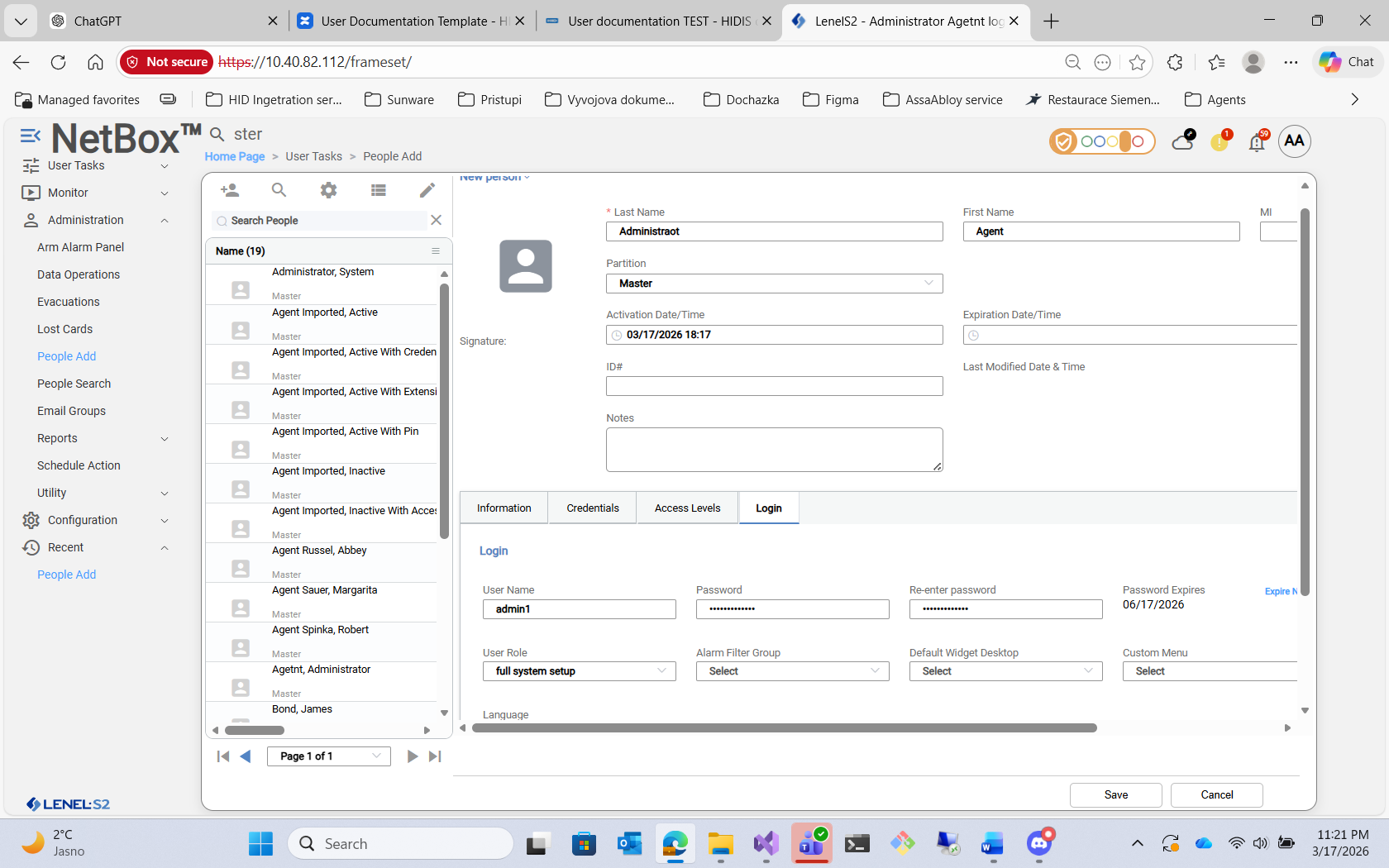
PACS – Creating Technical User (Login tab)
This user will be used for the agent integration.
Enable integration API
-
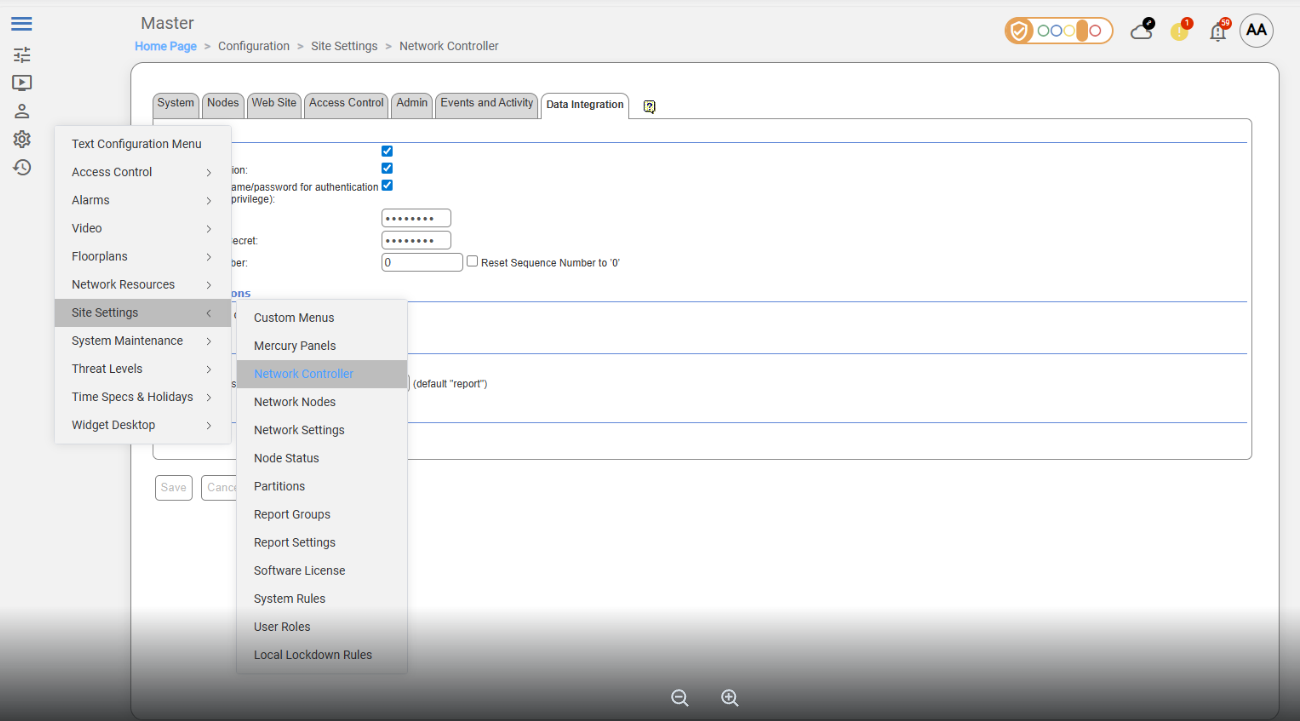
Navigate to: Configuration → Site Settings → Network Controller
-
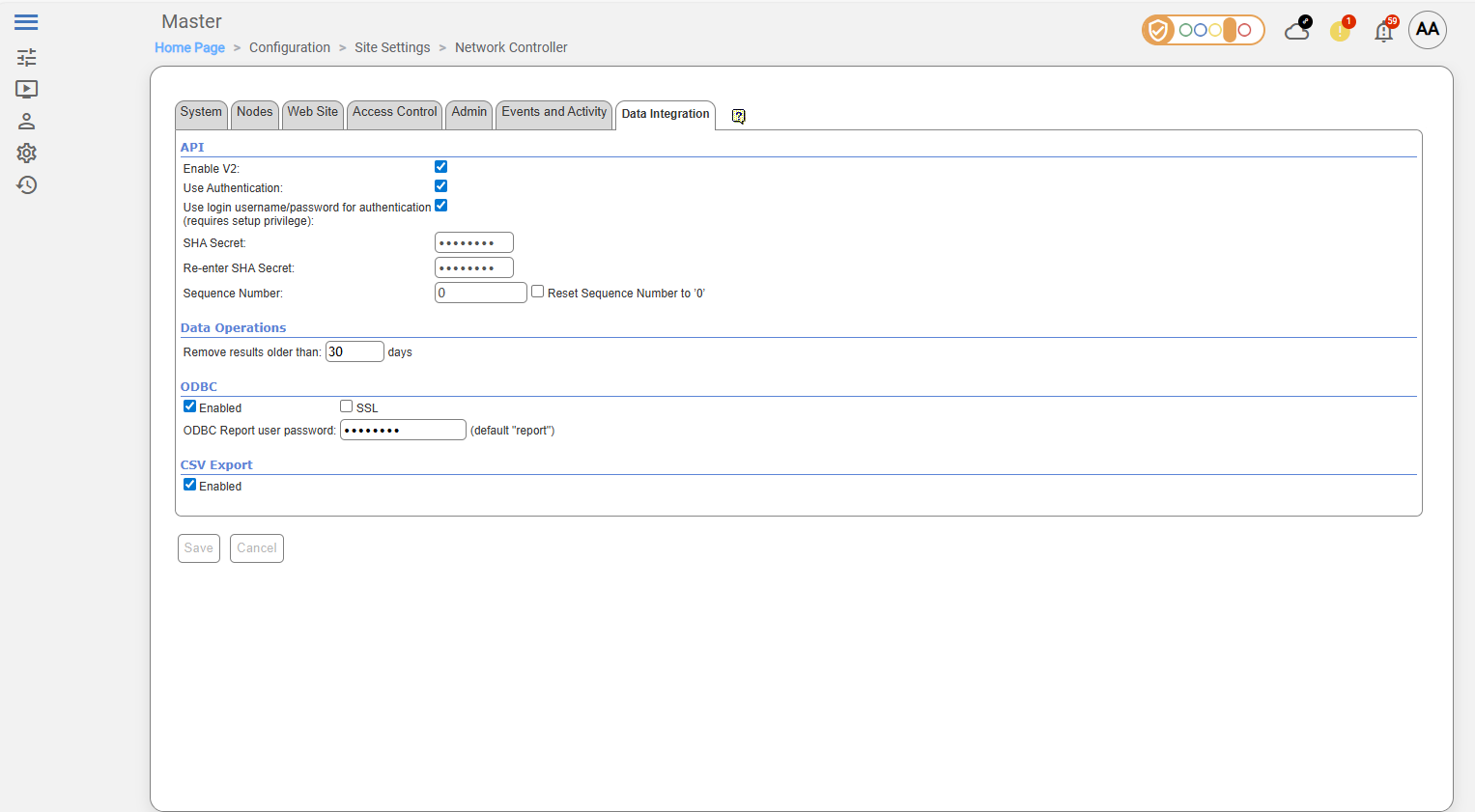
Select Data Integration tab
-
Enable API V2 access
-
Check Use Authentication
-
Check Use login username/password for authentication
-
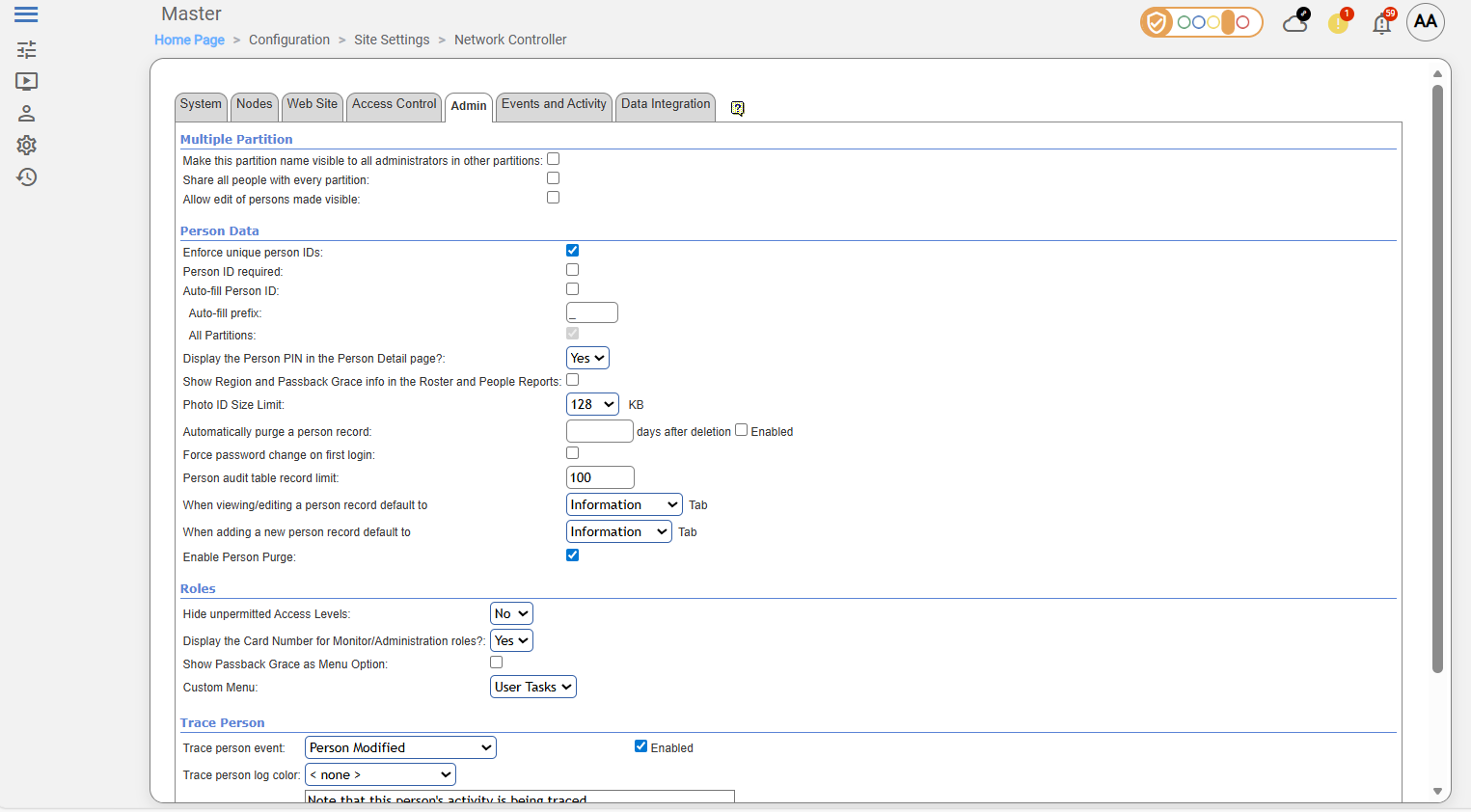
Enforce unique person IDs
-
Select Admin tab
-
Check Enforce unique person IDs
-
Credential formats
-
Maximum 64 enabled credential formats per NetBox controller; older hardware may support fewer.
-
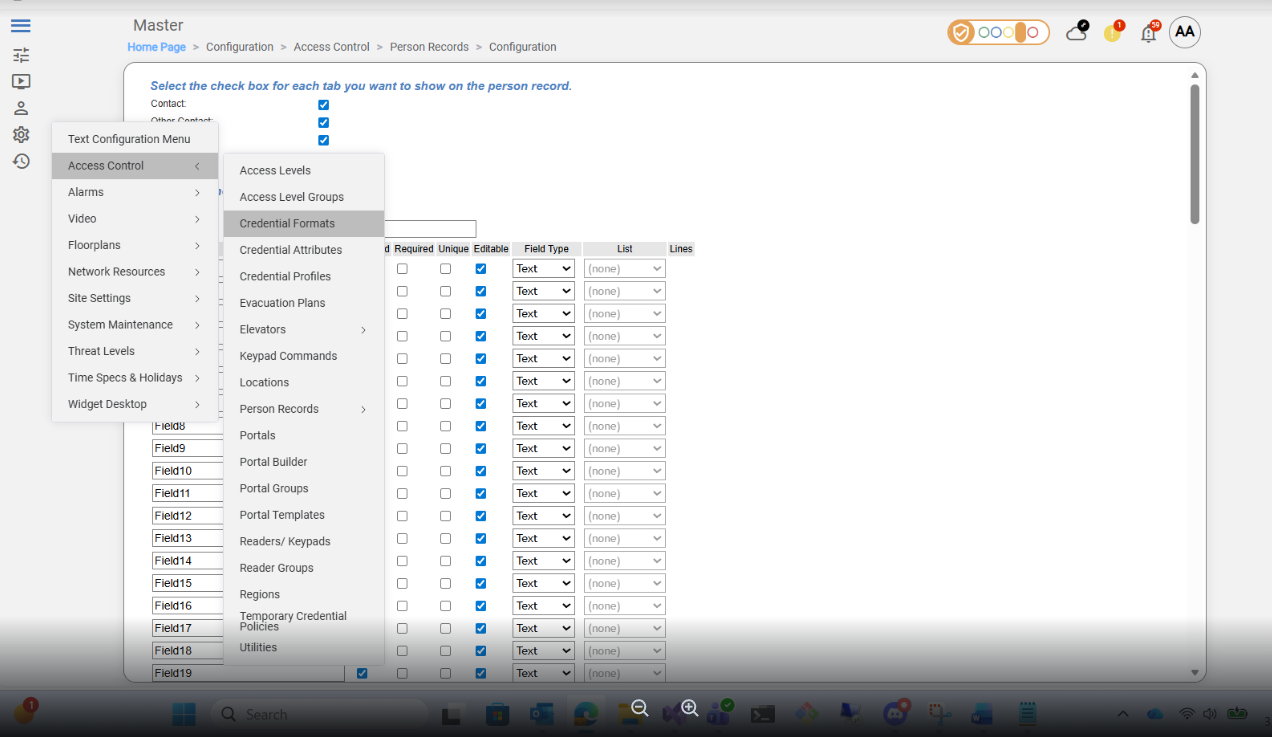
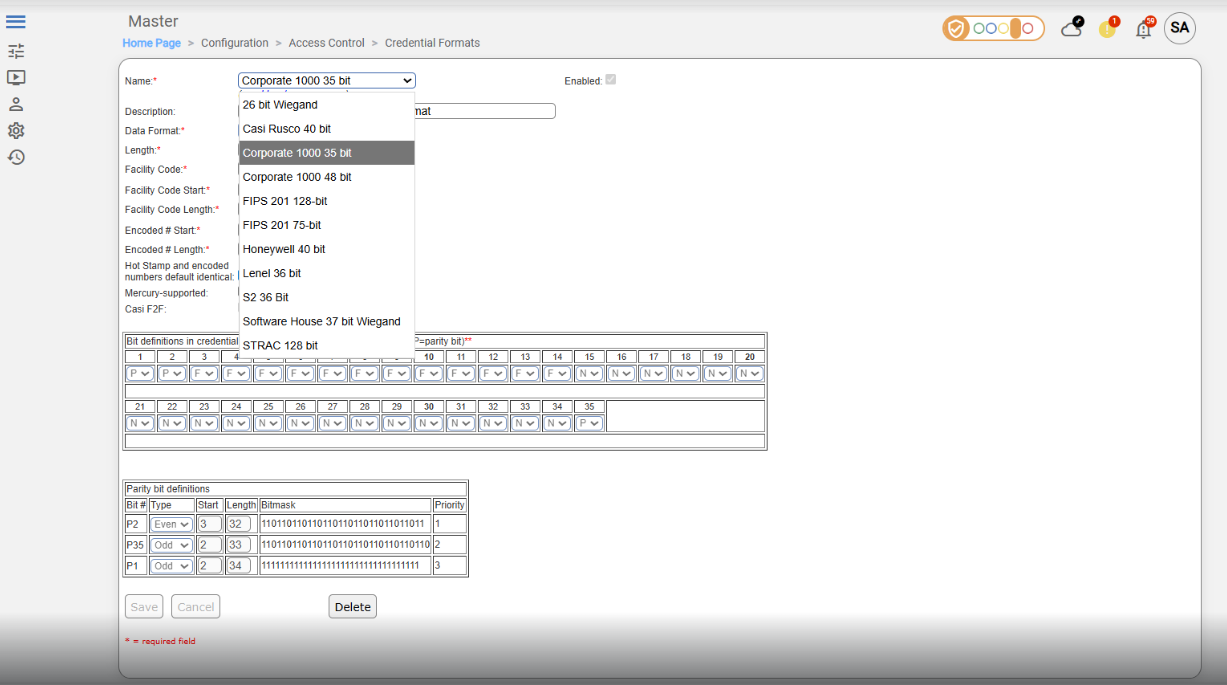
Only enabled formats are processed by the agent; disabled formats are ignored. To enable a format in the PACS interface, navigate to Configuration → Access Control → Credential Formats, select a format to enable and check the Enabled check-box:
-
Formats must be enabled in the agent configuration (HIS LenelS2 NetBox Agent | Card Formats).
Creating technical custom fields
-
Each EF used by the agent:
-
must be identified by its UDF key (
UDF1…UDF100); these keys map directly to PACS UI fields Field1…Field100, and are the only way to identify a field via API (e.g. in agent’s configuration file), even if the user renames them (e.g.ExternalId,IsVisitor) -
must have a Field Type (Text, Numeric, Boolean, List; see table below for mapping these values onto AIS data types)
-
must be enabled in PACS
-
-
UI Label (Field1…Field100 or renamed, e.g.,
ExternalId,IsVisitor) is optional; it only affects how it appears in the PACS interface -
Other UI options (checkboxes, tabs, template display) are optional and do not affect agent functionality
-
Ensure both required Extension Fields (EF) exist for agent integration; see HIS LenelS2 NetBox Agent | Creation of Extension Fields for step-by-step instructions.
|
PACS Entity |
PACS Field Type |
PACS UI Label |
UDF Key for Agent |
AIS entity |
|---|---|---|---|---|
|
Person |
Text |
leave original label (e.g. Field1) or rename (e.g. IsVisitor) |
e.g. UDF1 |
|
|
Person |
Text |
leave original label (e.g. Field2) or rename (e.g. ExternalId) |
e.g. UDF2 |
|
All required EFs must exist in PACS before agent configuration. Add any additional EFs as needed, with their data types and agent keys.
Access Units and Time Specifications
When defining Access Units (also known as Access Levels or Access Level Groups), it is mandatory to assign a Time Specification (Time Spec) to each unit. This ensures that access permissions are valid only during specified time periods.
By default, after installation, two predefined Time Specs are available:
-
Always — grants access at all times, every day including holidays, from 00:00 to 24:00.
-
Never — denies access at all times.
Initially, when configuring Access Units, you may select one of these default Time Specs.
If these defaults do not meet your scheduling requirements, additional Time Specs must be created to define custom access schedules (such as business hours, shift patterns, weekends only, etc.).
Proper assignment of Time Specs to Access Units is essential to ensure that access rights are enforced according to organizational policies and working schedules.
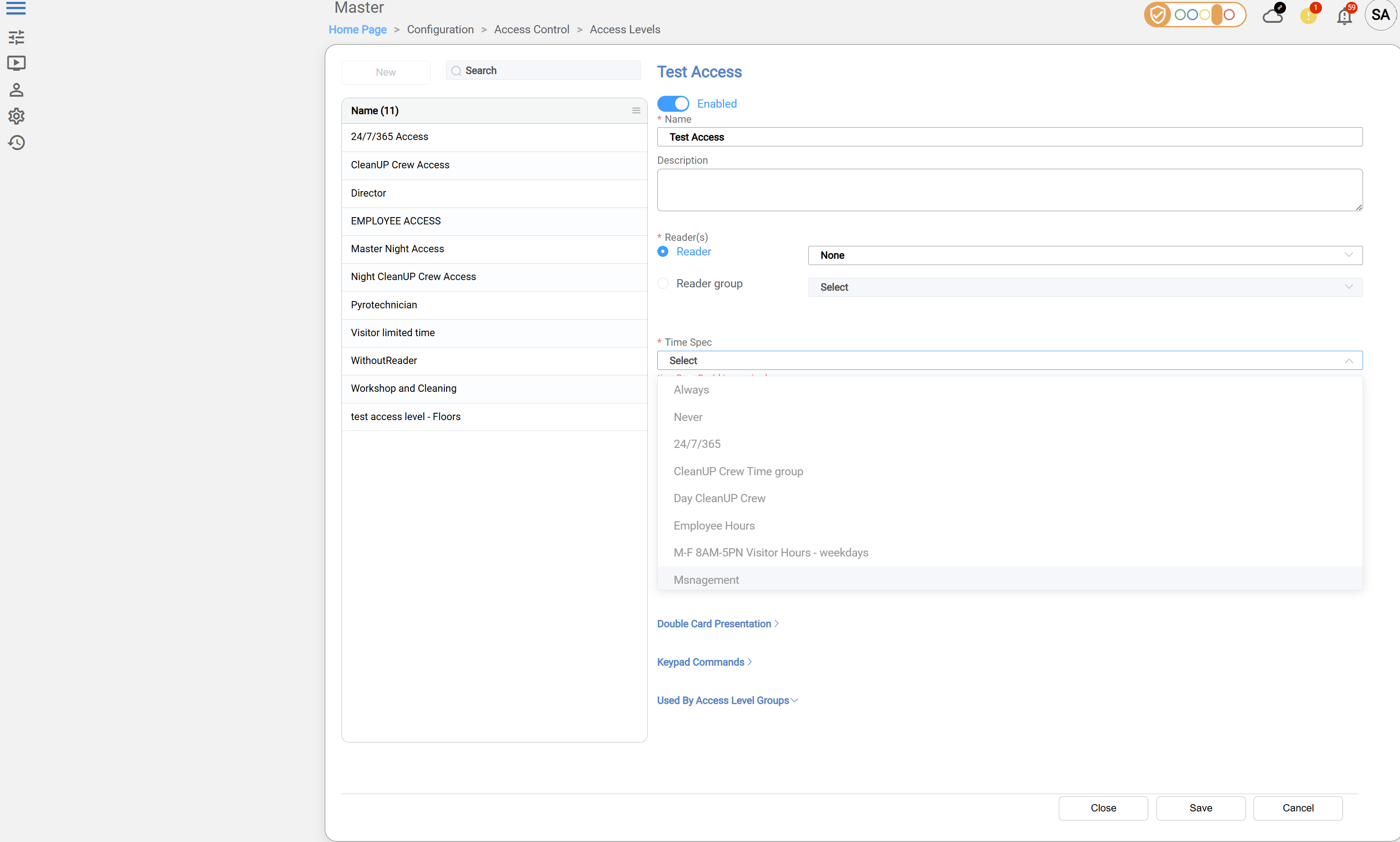
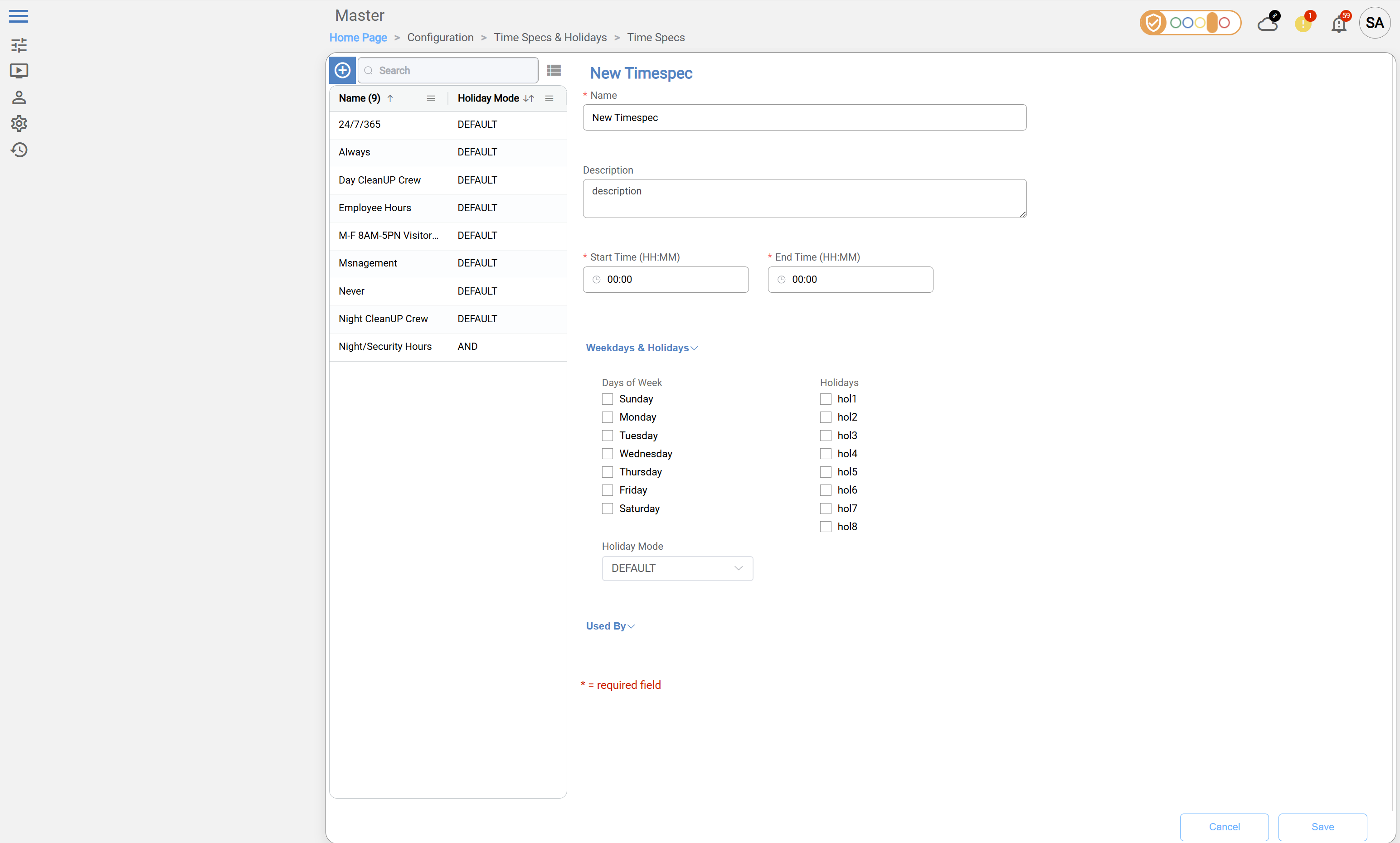
Below is an example screenshot of the Access Level configuration interface, highlighting the Time Spec selection dropdown. This illustrates where to select or assign the appropriate Time Specification for each Access Unit.
Create a New Access Level
Navigate to Home Page → Configuration → Access Control → Access Levels:
When creating a new Access Level, the following fields are mandatory:
-
Name – specify the access level name
-
Reader or Reader Group – select at least one
-
Time Specification (Time Spec) – assign a time schedule
-
Enable – switch the toggle at the top to enable the Access Level
-
Click Save
Create a New Time Specification
Navigate to: Home Page → Configuration → Time Specs & Holidays → Time Specs
When creating a new Time Specification, the following fields are mandatory:
-
Name – specify a name for the Time Specification
-
Start Time / End Time – define the time range for access
-
Click Save
Agent Configuration
General Agent Startup
For detailed instructions on how to download, configure, and run the HID Agent using Docker, please refer to the official Agent Startup Example in the HID Knowledge Base: Agent startup example
Agent-specific configuration
Settings related to network and connecting to PACS
Don't forget to replace the {pacs-name} placeholders with the actual name of the PACS agent.
Environment variables for LenelS2 NetBox Agent:
-
Netbox__BaseUrl: URL of the NetBox instance. Example:https://10.40.82.112 -
Netbox__ApiPath: API path used by the agent. Example:nbws/goforms/nbapi -
Netbox__UserName: Username fromHIS LenelS2 NetBox Agent | Creating the Technical User -
Netbox__Password: Password for the username above. -
Netbox__TurnOffSslVerification: Iftrue, SSL verification is disabled. Default:true -
Netbox__EmulateVisitors: Iftrue, agent emulates visitor behavior. Default:true -
Netbox__HttpRequestTimeout: Timeout in seconds for HTTP requests. Example:100
Only enabled User Defined Fields (UDFs) and Card Formats will be reachable through the agent. Disabled fields or formats will be ignored by the agent.
Extension Fields (UDFs)
-
The agent requires explicit configuration of User Defined Fields (UDFs). This is because the API provided with the PACS only exposes fixed UDF positions (UDF1…UDF100), so the agent cannot read additional configuration that is accessible through the UI (e.g. information whether the field is renamed, enabled/disabled, required, etc.).
In particular:-
The API always uses original UDF keys (e.g., UDF1…UDF100), even if labels are changed in the UI.
-
There is no API mechanism to map UDF positions to their UI labels.
-
The agent cannot determine which UDFs are relevant, required, or actively used.
-
Only a limited number of User-Defined Fields (UDFs) can be set via API in person-related commands. The documentation recommends a maximum of 20 UDFs, but these do not have to be the first 20 fields (UDF1…UDF20); any available UDFs (UDF1…UDF100) can be used. It is possible to set more than 20 fields, but since the exact limit is not known, it is safest to follow the documentation and stick to the recommended number.
-
The actual number of UDFs that can be successfully set may vary depending on system version or setup.
-
Only fields that are intended to be used by the integration need to be defined in the agent configuration.
-
For UDF keys mapping, see HIS LenelS2 NetBox Agent | Creating technical custom fields.
|
Environment Variable |
Description |
Example |
|---|---|---|
|
|
Field label (used by AIS) |
IsVisitor |
|
|
UDF key (used by Agent for communicating with the PACS) |
UDF10 |
|
|
AIS data type (see table below for supported values) |
String |
|
|
Field label (used by AIS) |
ExternalId |
|
|
UDF key (used by Agent for communicating with the PACS) |
UDF11 |
|
|
AIS data type (see table below for supported values) |
String |
|
… |
… |
|
Available types of extension fields:
|
Field Type (UI / PACS) |
Agent |
AIS ExtensionFieldType |
|---|---|---|
|
Text / String |
"Text" or "String" |
ExtensionFieldType.String |
|
Boolean |
"Boolean" |
ExtensionFieldType.Boolean |
|
Numeric / Integer |
"Integer" |
ExtensionFieldType.Integer |
Fields with the semantics of AIS Types "Decimal" and "DateTime" should be set up as String fields.
Important: The agent requires the original UDF keys (e.g., UDF10, UDF11) in the configuration. Names can be changed in the UI without affecting the agent.
Card Formats
-
The agent requires explicit card format configuration because the PACS API does not expose any information about which card formats exist or whether they are enabled. The agent uses the Card Format settings to determine valid Facility ID and Card ID ranges for credentials; without this, credential creation or validation may fail.
-
Only formats that are enabled in PACS UI should be listed in the agent configuration. Formats that are disabled in PACS will be ignored.
The Facility ID is defined as part of the card format in PACS; however, it is not transmitted via the agent API and cannot be set or modified during credential operations (see Limitations section).
In certain environments (such as demo applications), the Facility ID may be ignored entirely. Despite this, the agent configuration still requires Facility ID constraints to be defined.
When the Facility ID is not used, it is recommended to configure it with placeholder ranges. In these cases, only the Card ID constraints are effectively enforced.
-
Card format definitions (including Facility ID and Card ID ranges) must be obtained from the PACS UI, as they are not exposed via the API
-
For how to find and configure Card Formats in PACS UI, see HIS LenelS2 NetBox Agent | Credential formats.
|
Environment Variable |
Description |
Example / Range |
|---|---|---|
|
Netbox__Formats__0__Name |
Name of the format |
26 bit Wiegand |
|
Netbox__Formats__0__Constraints__CardId__Min |
Minimum Card ID |
10 |
|
Netbox__Formats__0__Constraints__CardId__Max |
Maximum Card ID |
25 |
|
Netbox__Formats__1__Name |
Format name |
Casi Rusco 40 bit |
|
Netbox__Formats__1__Constraints__CardId__Min |
Min Card ID |
20 |
|
Netbox__Formats__1__Constraints__CardId__Max |
Max Card ID |
38 |
|
… |
… |
… |
Example of an agent-specific .env file
Netbox__BaseUrl=<link-to-netbox>
Netbox__ApiPath=<api-path>
Netbox__UserName=<user-name>
Netbox__Password=<password>
Netbox__TurnOffSslVerification=<true|false>
Netbox__EmulateVisitors=<true|false>
Netbox__HttpRequestTimeout=<timeout-in-seconds>

Netbox__UserDefinedFields__0__Name=<UDF-label>
Netbox__UserDefinedFields__0__UdfKey=<UDF-key>
Netbox__UserDefinedFields__0__Type=<String|Integer|Boolean>
Netbox__UserDefinedFields__0__Enabled=<true|false>

Netbox__Formats__0__Name=<Format-name>
Netbox__Formats__0__Constraints__CardId__Min=<min>
Netbox__Formats__0__Constraints__CardId__Max=<max>
Limitations
Unsupported Operations
-
Identity Activate and Deactivate operations -
Visit Check-In and Check-Out operations -
Identity & Visit PIN activation/deactivation operations -
Events Writing to the PACS operation
Limited operation
|
Operation |
Note |
|---|---|
|
|
Facility ID is a property of the card format in PACS and is not transmitted via the agent API
|
|
|
Custom extension fields for identity credentials and visit credentials are not supported, but it is possible to access and modify the self (native) fields. |
|
|
|
Other limitations
PIN Assignment
-
PIN must be 4–6 digits numeric; hardware may limit supported length.
Identity & Visit State
-
All created Identities and Visits are always in Active state.
Access Units
-
Called “access level” on the PACS.
-
Maximum 32 access levels per person; excess levels are ignored.
-
Access assignments must respect working schedules, meaning that access permissions are only effective during the user’s defined working hours or shifts. Any access assigned outside these periods will be inactive or denied. For details on creating Access Units and assigning Time Specifications, see the section HIS LenelS2 NetBox Agent | Access Units and Time Specifications .
User Defined Fields - UDF (PACS extension fields)
-
Only 20 UDFs can be set via API, even if up to 100 exist in UI.
-
API uses original keys (UDF1…UDF100); renamed labels in UI cannot be used in API calls.
For more details on creating Access Levels and assigning Time Specifications, see the section HIS LenelS2 NetBox Agent | Access Units and Time Specifications.
-
The PACS does not support the removal of extension field values, so removal is emulated by returning the value to a default value:
0for Integer fields, andfalsefor Boolean type PACS fields.
Conversely, when the Agent encounters0andfalseare reported, meaning that complete removal of a field with Integer or Boolean value that has been once set is not possible through the Agent.
Photos / Images
-
Retrieval: up to 120 KB
-
Upload: up to 650 KB
Naming Mapping
Entities
|
AIS Entity Name |
PACS GUI Term |
|---|---|
|
Identity |
Person with “I” type - defined by IsVisitor UDF |
|
Visit |
Person with “V” type - defined by IsVisitor UDF |
|
Credential |
Access Card |
|
Access Unit |
Access Level |
|
Extension field |
User-Defined Field |
Operations
|
AIS Operation Name |
PACS GUI Term |
|---|---|
|
Delete |
Purge |
Creation of Extension Fields
Manual for Creating an Extension Field
-
Log in to PACS as an administrator
-
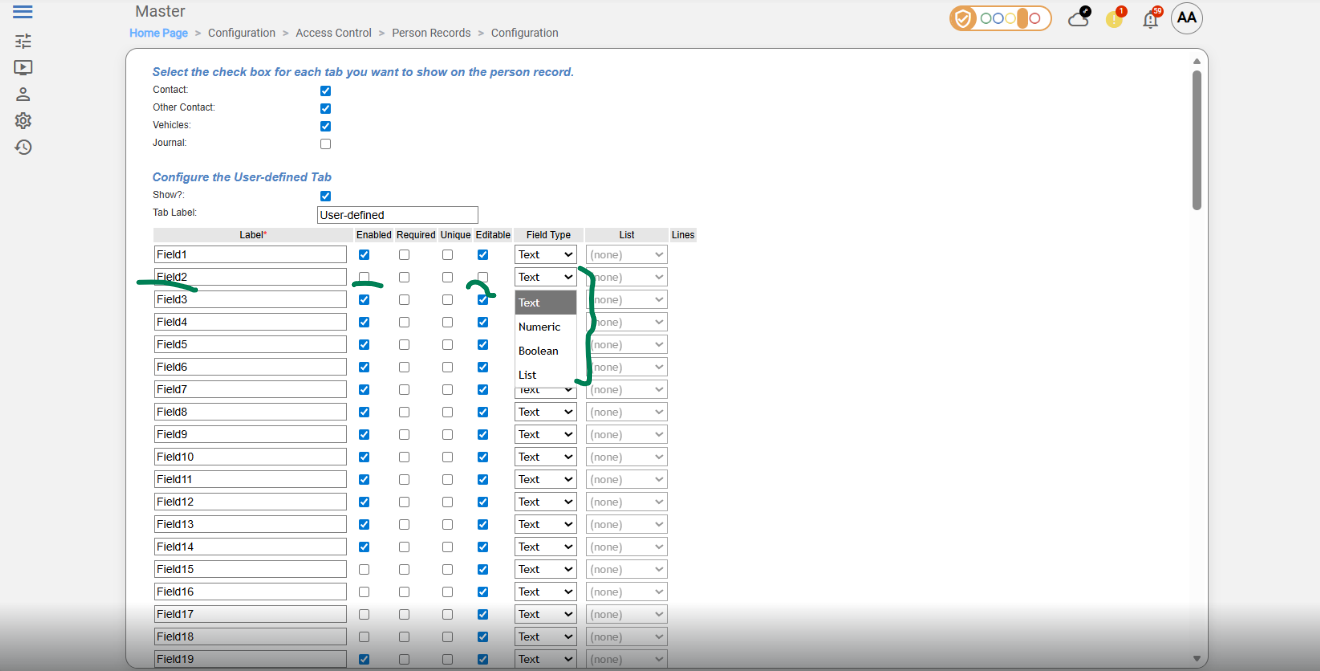
Navigate to: Configuration → Access Control → Person Records-> Configuration
-
Select the field to use (e.g., Field 2).
-
Check Enable check-box.
-
Check Editable check-box
-
Select the field data type in drop-down list Field Type
-
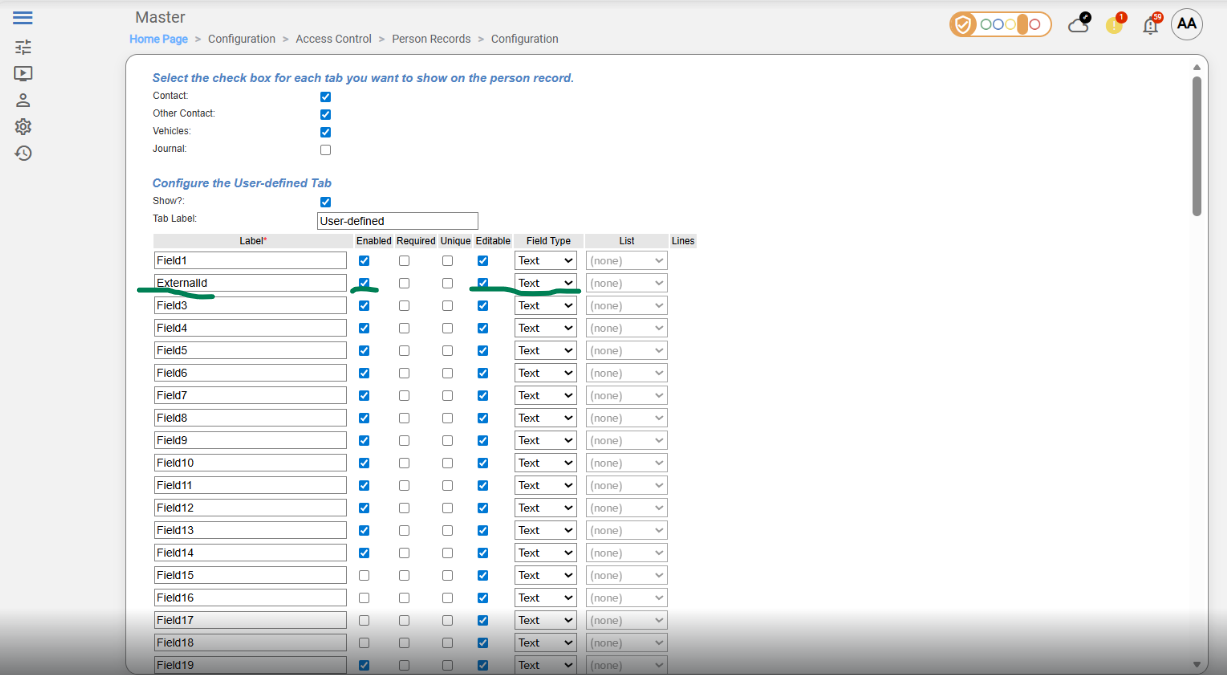
Optional: Change the field label (UI only).
-
Save changes
Supported entities and data types
List of Entities Supporting Extension Fields (Relevant to AIS)
|
Entity |
Supports EFs |
|---|---|
|
Identity |
Yes |
|
Visit |
Yes |
|
Credential |
No |
|
Access Unit |
No |
List of Supported Data Types for Extension Fields
|
Variable type (AIS) |
Variable type (NetBox) |
|---|---|
|
Boolean |
Boolean |
|
Integer |
Numeric |
|
Decimal |
Emulated (Text) |
|
String |
Text |
|
DateTime |
Emulated (Text) |