
Introduction
This document describes how to install, configure, and operate the Nedap AEOS PACS Agent for integration with the HID Integration Service (HIS / AIS).
Prerequisites
Required PACS
-
Nedap AEOS
-
AEOS SOAP API must be accessible from the agent
-
For supported Nedap AEOS version, please see the HID Knowledge Base compatibility matrix: https://hidis.atlassian.net/wiki/x/DIAa.
Configuration
PACS Configuration
Creating the Technical User
-
Open AEOS Web Administration
-
Create a new role with required permissions
The technical user must have access to:-
Employees
-
Visitors
-
Identifiers (Credentials)
-
Authorizable Carrier Groups
-
Free Fields
-
PIN management
-
Images (optional, if enabled)
-
-
Create a user and assign the role
-
Store credentials for agent configuration
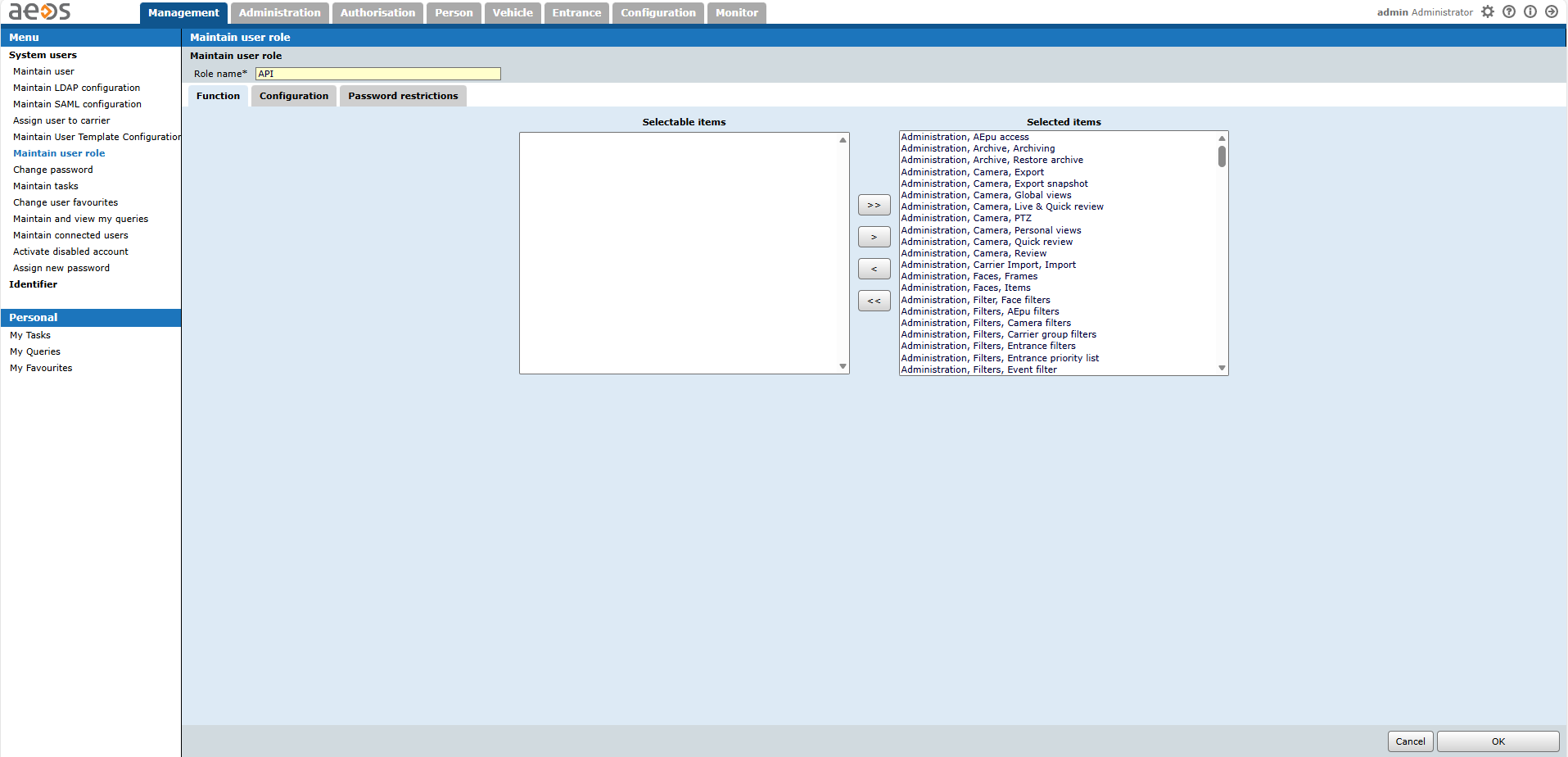
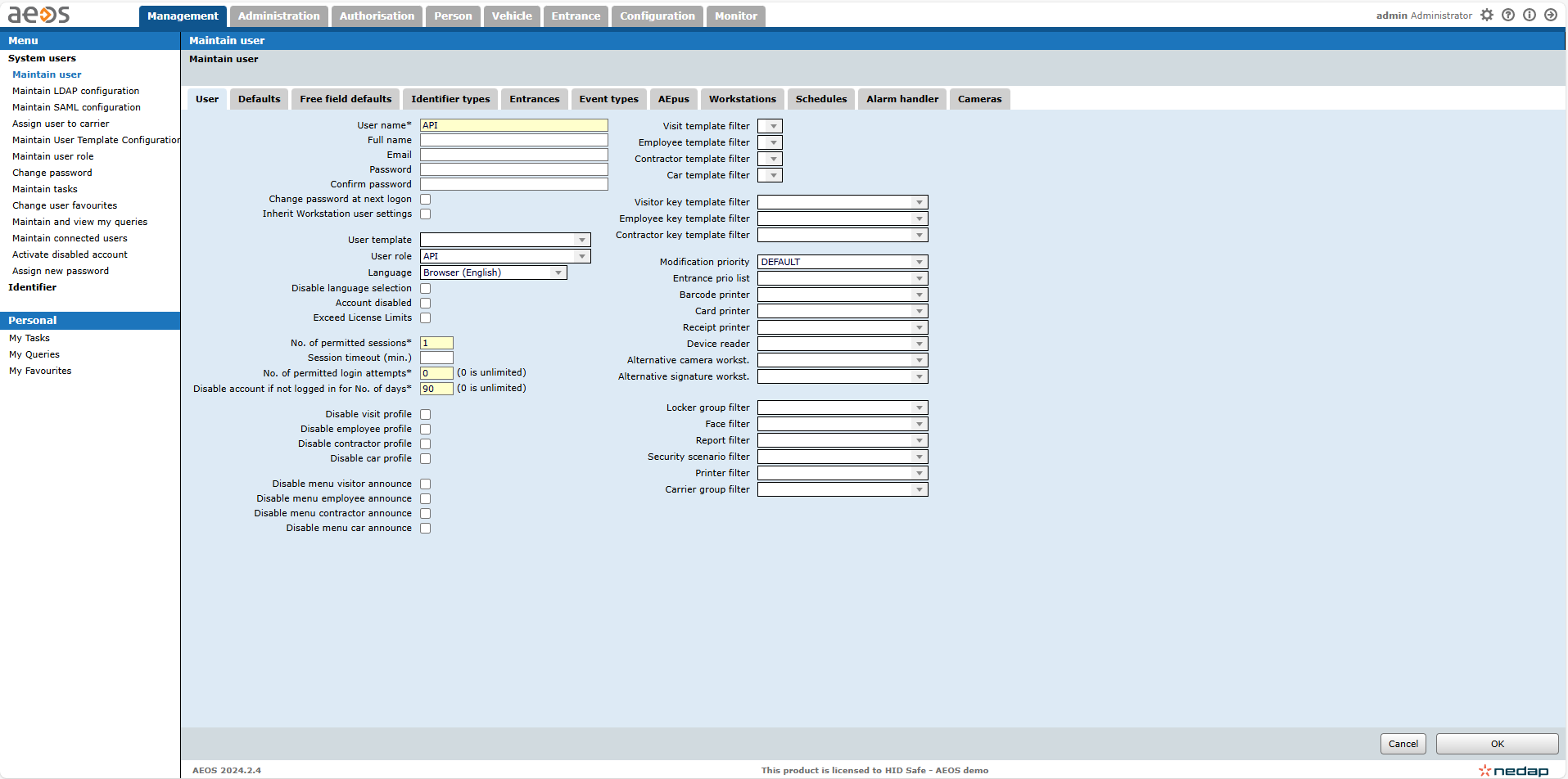
Important:
After creating or modifying free fields, assign them to the API role to ensure visibility.
Access Unit Setup
In AEOS, Access Units are represented as:
Authorizable Carrier Groups
Ensure:
-
Required carrier groups exist
-
They are used for assigning access to employees and visitors
Creating Technical Custom Fields
Refer to Extension Field Setup (Manual)
Required Fields
|
Entity |
Field Name |
Type |
|---|---|---|
|
Identity |
ExternalId |
String |
|
Visit |
ExternalId |
String |
After creating each technical custom field, note its DefinitionId and Name for agent configuration, and assign it to the API Role.
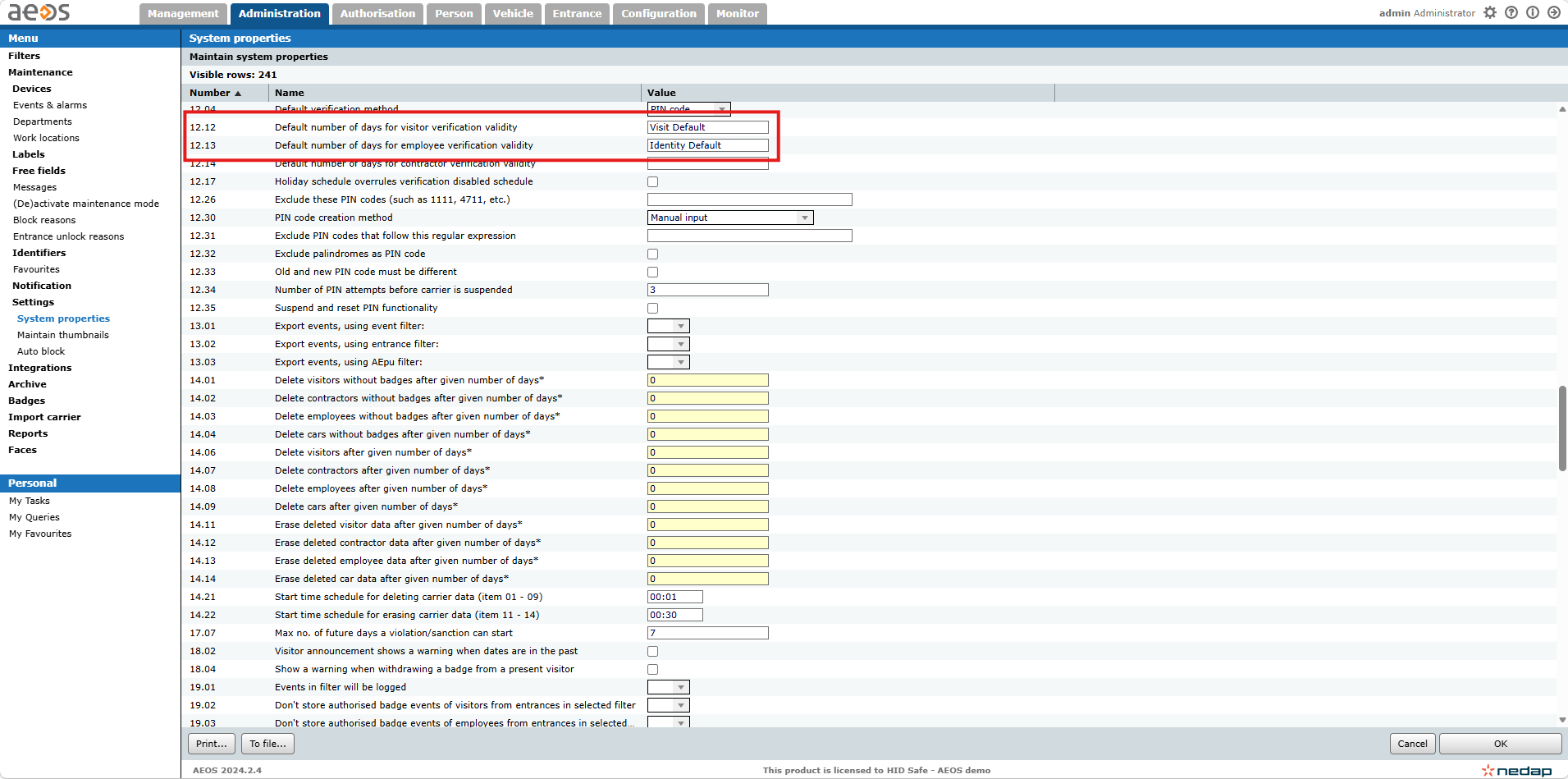
Default Validity Period for Carriers
A default validity period may be configured inside AEOS. If left unconfigured the validity period will not be set with an EndDate for either Visits or Identities.
Agent Configuration
General Startup
Step 1: Download
To obtain the pacs-agent_{pacs-name} Docker image, follow the HID Agent Administration Guide for End-Customer.
Step 2: Create environment
Create a file named .env with the following content:
Agent__TenantId=example-tenant-id
Agent__PacsId=example-pacs-id
Auth__ClientId=your-client-id
Auth__ClientSecret=your-client-secret
In case you are connecting to a different environment than HID production, you need to set the proper URLs:
Auth__AuthNProvider=https://auth.example.com
Agent__PlatformUrl=https://platform.example.com
-
Adjust all file parameters according to your setup.
-
It is recommended to store this configuration on an encrypted drive or delete
.envfile as soon as the Docker image is executed.
Step 3: Run Docker image
docker run -d \
  --env-file .env \
  pacs-agent-{pacs-name}:latest
Step 4: Check that the Docker image is running
docker ps
Environment variables description
Related to HIS
-
Agent__PlatformUrl: HID Integration Service URL (https://his.hidglobal.com/ais/v1).-
This information is provided by HID. By default, this is set automatically to the production environment value and does not need to be set manually in most cases.
-
-
Agent__TenantId: Tenant ID within HID Integration Service.-
This information is provided by HID.
-
-
Agent__PacsId: Unique ID assigned to the agent during registration.-
This information is provided by HID.
-
If you registered your PACS on your own, this would be the
IDyou gave to the PACS.
-
Related to HID Authentication Service
-
Auth__AuthNProvider: HID Authentication Service URL (https://auth-us.api.hidglobal.com/idp/t89d23e0b2445510399335/authn).-
This information is provided by HID. By default, this is set automatically to the production environment value and does not need to be set manually in most cases.
-
-
Auth__ClientId: Client ID obtained during registration.-
This information is provided by HID.
-
-
Auth__ClientSecret: Client secret obtained during registration.-
This information is provided by HID.
-
Don't forget to replace the {pacs-name} placeholders with the actual name of the pact agent.
Agent-specific configuration
{pacs-name} = nedap-aeos
All AEOS-related settings are configured under the Aeos section.
These can be provided via:
-
Environment variables (
Aeos__*) for Docker deployments -
appsettings.json("Aeos": {}) for local development
Environment variables description:
Connection Settings
|
Variable |
Description |
|---|---|
|
|
AEOS SOAP API endpoint |
|
|
Technical user username |
|
|
Technical user password |
External ID Configuration
Notes
-
These must match AEOS free field names exactly
-
Fields must exist and be assigned to the API role
|
Variable |
Description |
|---|---|
|
|
Name of the ExternalId field for Identities (Employees) |
|
|
Name of the ExternalId field for Visits (Visitors) |
Extension Field Mapping
The agent requires explicit configuration of extension fields to map AEOS free fields to AIS data types.
Behavior:
-
Only configured fields are processed
-
Field names must exactly match AEOS free field names
-
Fields must exist in AEOS and be assigned to the API role
Configuration:
"Aeos": {
  "IdentityExtensionFields": {
    "FieldName": "Type"
  },
  "VisitExtensionFields": {
    "FieldName": "Type"
  }
}
Example:
"Aeos": {
  "IdentityExtensionFields": {
    "Department": "String",
    "IsActive": "Boolean",
    "HireDate": "DateTime"
  },
  "VisitExtensionFields": {
    "Purpose": "String",
    "ExpectedArrival": "DateTime"
  }
}
Free Field Categories
Explanation. In AEOS:
-
Free fields are grouped into categories
-
Each category is assigned to a carrier type:
-
Employee (Identity)
-
Visitor (Visit)
-
These variables must reference the categories where the configured extension fields are defined.
|
Variable |
Description |
|---|---|
|
|
Category containing Identity (Employee) extension fields |
|
|
Category containing Visit (Visitor) extension fields |
Behavior Settings
|
Variable |
Description |
|---|---|
|
|
Default validity period (in days) |
|
|
Fixed value: |
Optional Features
|
Variable |
Description |
|---|---|
|
|
Enables photo synchronization |
|
|
Enables event forwarding |
SSL Configuration
-
Recommended (Secure):
|
Variable |
Description |
|---|---|
|
|
Trusted server certificate fingerprint |
-
Development Only (Not Recommended):
|
Variable |
Description |
|---|---|
|
|
Disables SSL certificate validation |
Option 2 (ignore the SSL certificate) is not recommended in production.
SSL/TLS encryption is still used, but the agent will accept any server certificate, including invalid or untrusted ones.
Agent-specific .env file part example:
Aeos__Url=https://aeos.example.com/soap
Aeos__UserName=api-user
Aeos__Password=secure-password

Aeos__IdentityExternalIdFieldName=ExternalId
Aeos__VisitExternalIdFieldName=ExternalId

Aeos__IdentityFreeFieldCategoryId=10
Aeos__VisitFreeFieldCategoryId=20

Aeos__DefaultActiveDays=30
Aeos__AccessUnitType=AuthorizableCarrierGroup

Aeos__EnablePictures=true
Aeos__EnableEvents=true

Aeos__IdentityExtensionFields__Department=String
Aeos__IdentityExtensionFields__IsActive=Boolean
Aeos__IdentityExtensionFields__HireDate=DateTime

Aeos__VisitExtensionFields__Purpose=String
Aeos__VisitExtensionFields__ExpectedArrival=DateTime
Agent-specific appsettings.json example:
{
  "Aeos": {
    "Url": "https://aeos.example.com/soap",
    "UserName": "api-user",
    "Password": "secure-password",

    "IdentityExternalIdFieldName": "ExternalId",
    "VisitExternalIdFieldName": "ExternalId",

    "IdentityFreeFieldCategoryId": 10,
    "VisitFreeFieldCategoryId": 20,

    "DefaultActiveDays": 30,
    "AccessUnitType": "AuthorizableCarrierGroup",

    "EnablePictures": true,
    "EnableEvents": true,

    "IdentityExtensionFields": {
      "Department": "String"
    },
    "VisitExtensionFields": {
      "Purpose": "String"
    }
  }
}
Limitations
General limitations
-
Extension fields must be created manually in AEOS
-
Identifier Types must exist before use
-
Extension fields are not supported on:
-
PINs
-
Credentials
-
Unsupported Operations
-
Events Writing to the PACS
Limited Operations
The proper behavior could not be confirmed for all visit-related operations. There is a chance that access is not being propagated to the control panels.
Naming Mapping
Entities
|
AIS Entity |
AEOS Term |
|---|---|
|
Identity |
Employee |
|
Visit |
Visitor |
|
Credential |
Identifier |
|
Card Format |
Identifier Type |
|
Access Unit |
Authorizable Carrier Group |
|
Extension Field |
Free Field |
Operations
|
AIS Operation |
AEOS Behavior |
|---|---|
|
Activate |
Set LeaveDateTime in future |
|
Deactivate |
Set LeaveDateTime in past |
|
Check-In |
Same as Activate |
|
Check-Out |
Same as Deactivate |
Creation of Extension Fields
Supported Entities and Data Types
List of Entities Supporting Extension Fields:
|
Entity |
Supported |
|---|---|
|
Identity |
Yes |
|
Visit |
Yes |
|
Credential |
No |
|
Pin |
No |
List of Supported Data Types for Extension Fields:
|
AIS Type |
AEOS Type |
|---|---|
|
Boolean |
Yes/No |
|
Integer |
Numeric |
|
Decimal |
Numeric |
|
String |
String |
|
DateTime |
DateTime |
Manual for Creating an EF in the PACS
Identity
-
Open AEOS Administration
-
In the Menu on the left, navigate to Maintenance > Free Fields
-
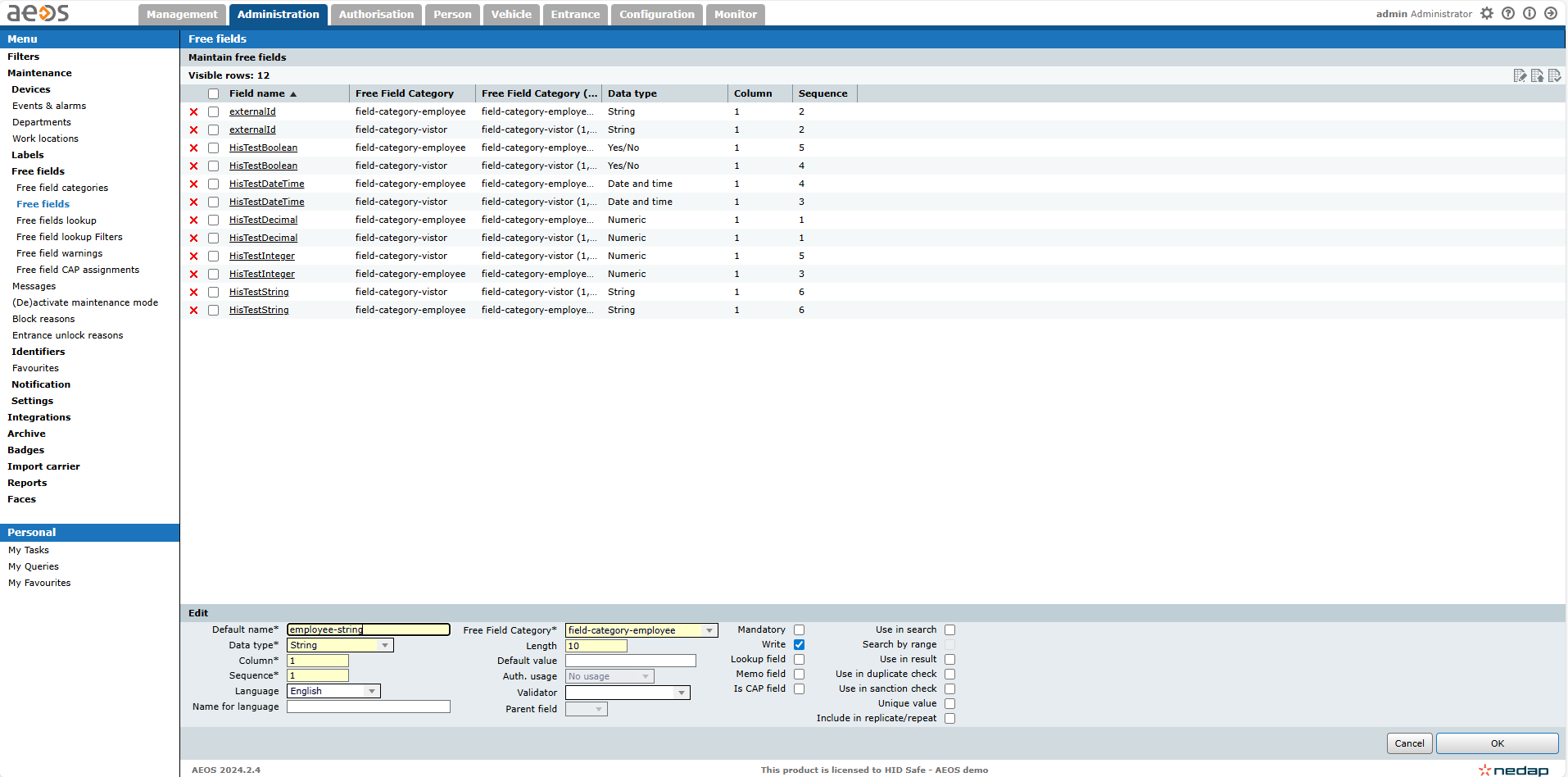
Create or select category assigned to Employee
-
Create field:
-
Name:
ExternalId -
Type:
String
-
-
Save
-
Assign to API role
-
Record:
-
DefinitionId
-
Name
-
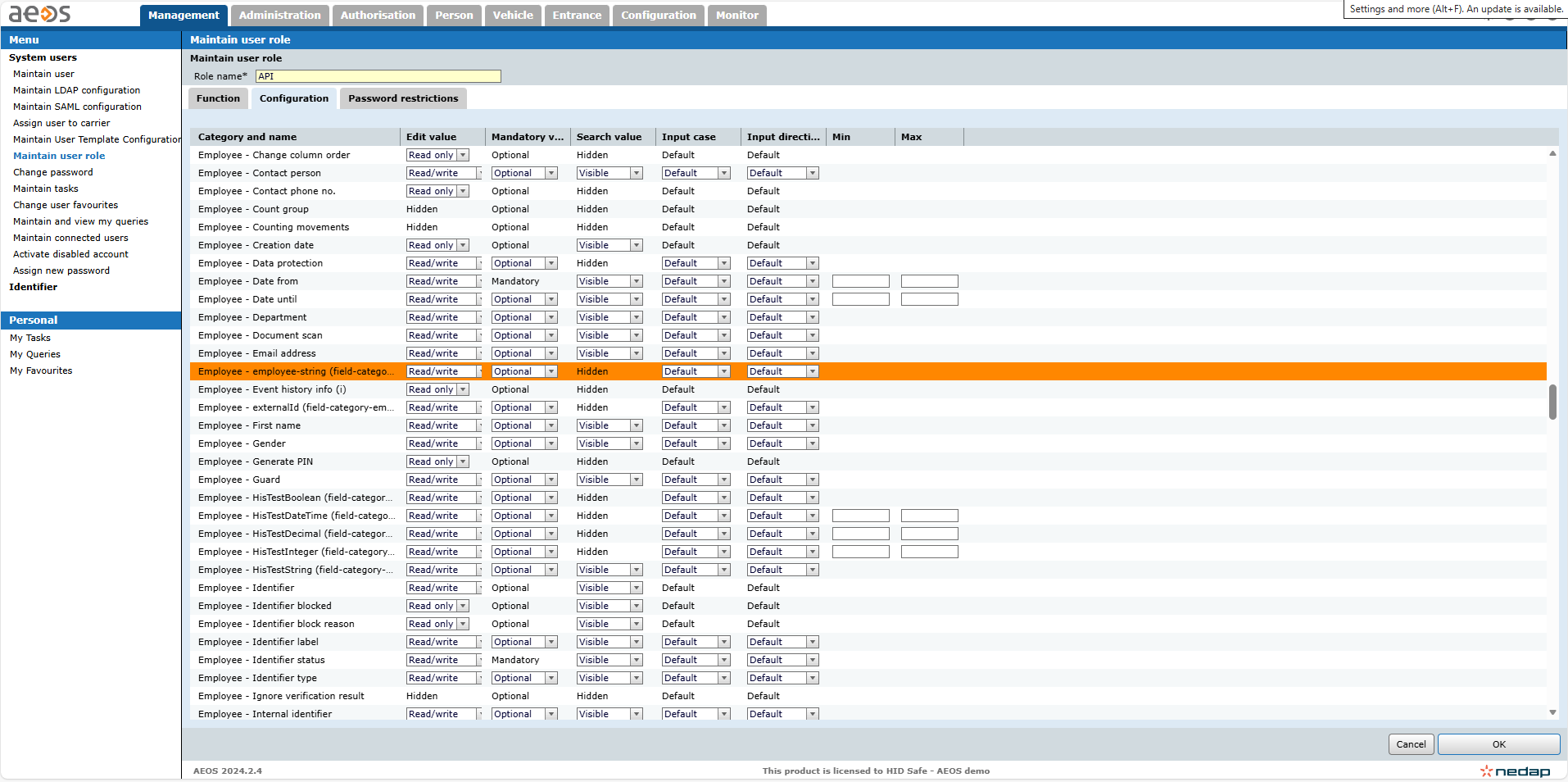
Creation:
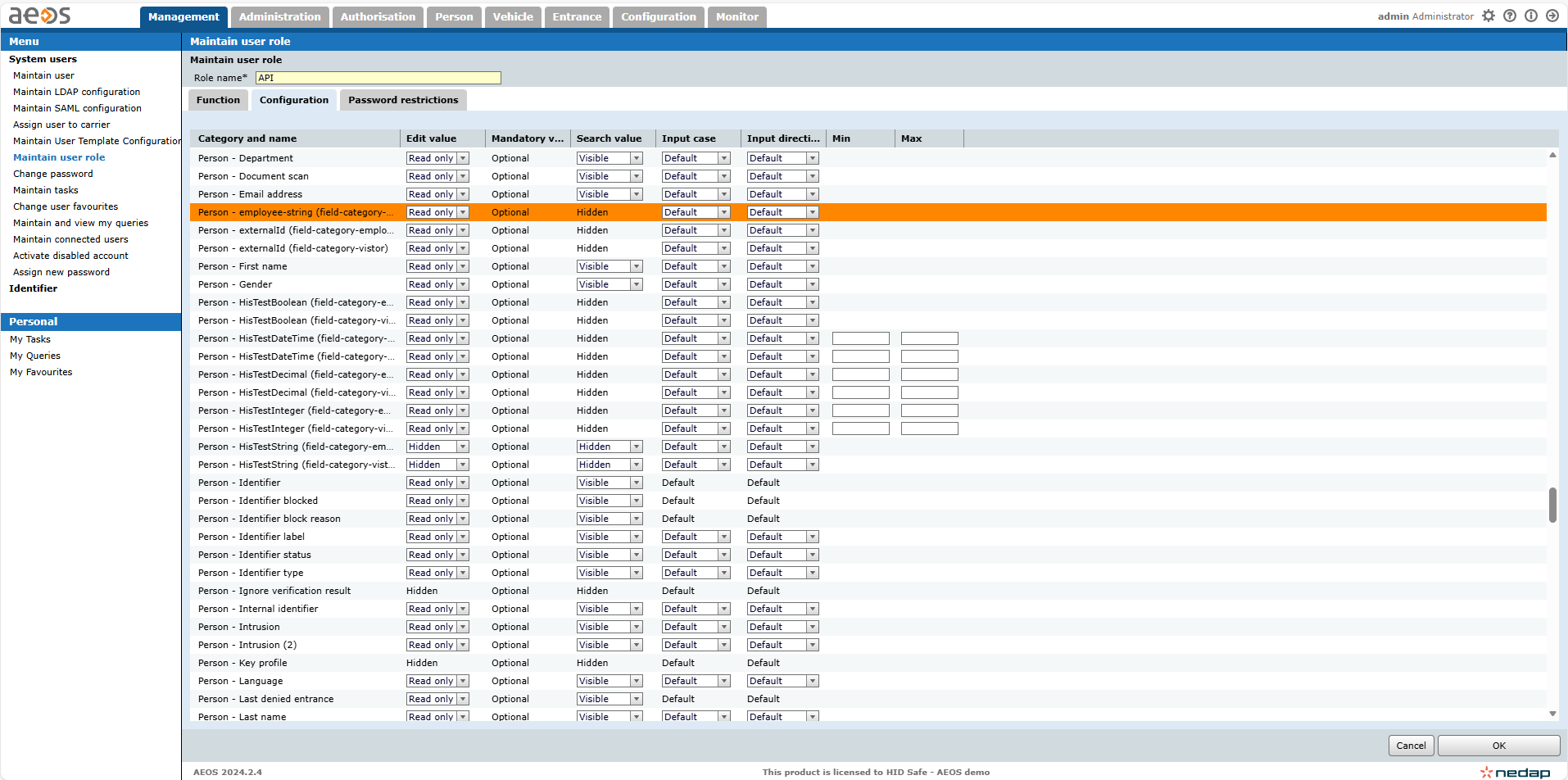
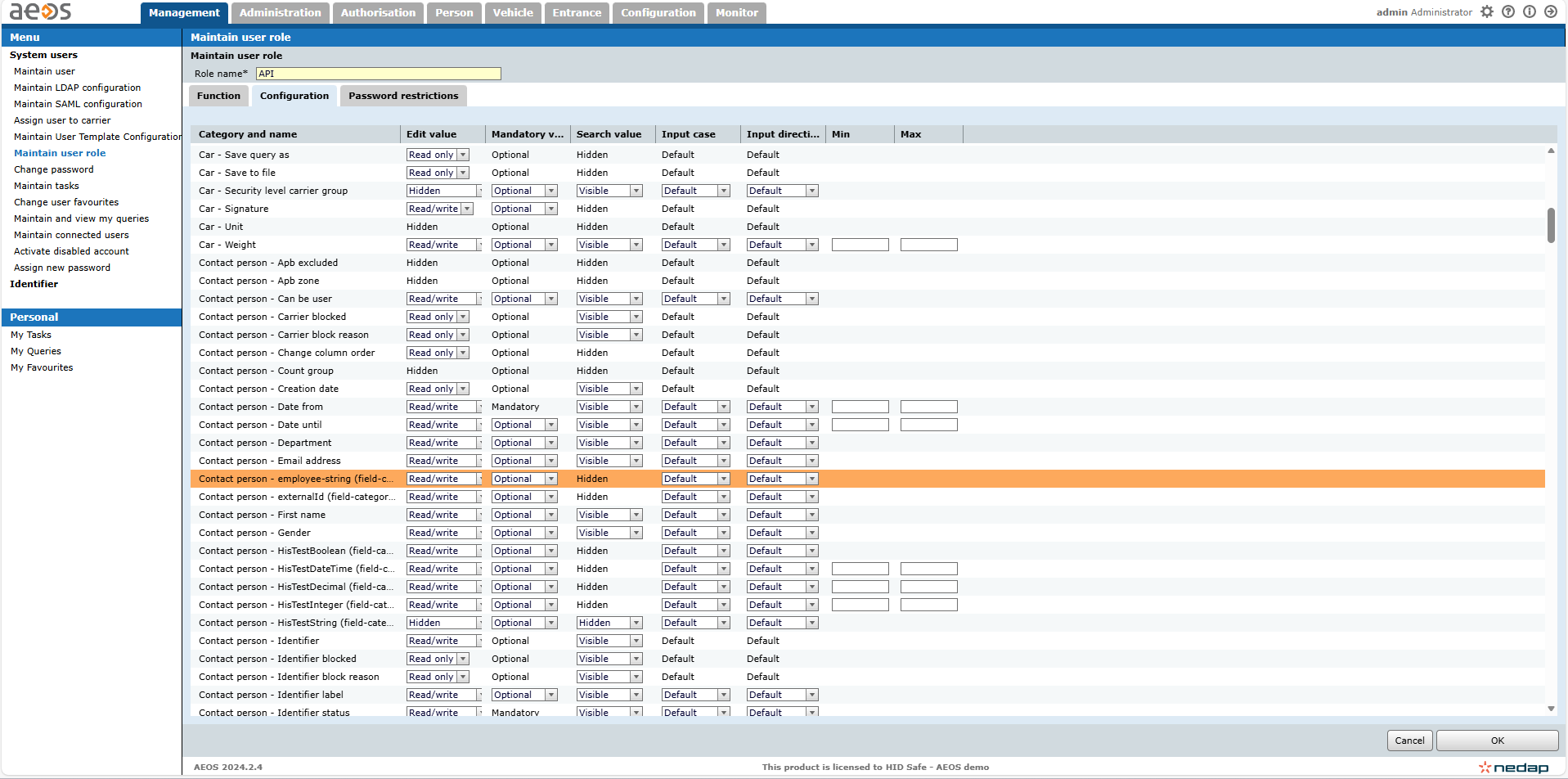
Assignment:
Read/Write to Employee:
Read only to Person:
Read/Write to Contact person:
Visit
-
Open AEOS Administration
-
Navigate to Free Fields
-
Create or select category assigned to Visitor
-
Create field:
-
Name:
ExternalId -
Type:
String
-
-
Save
-
Assign to API role
-
Record:
-
DefinitionId
-
Name
-
Creation:
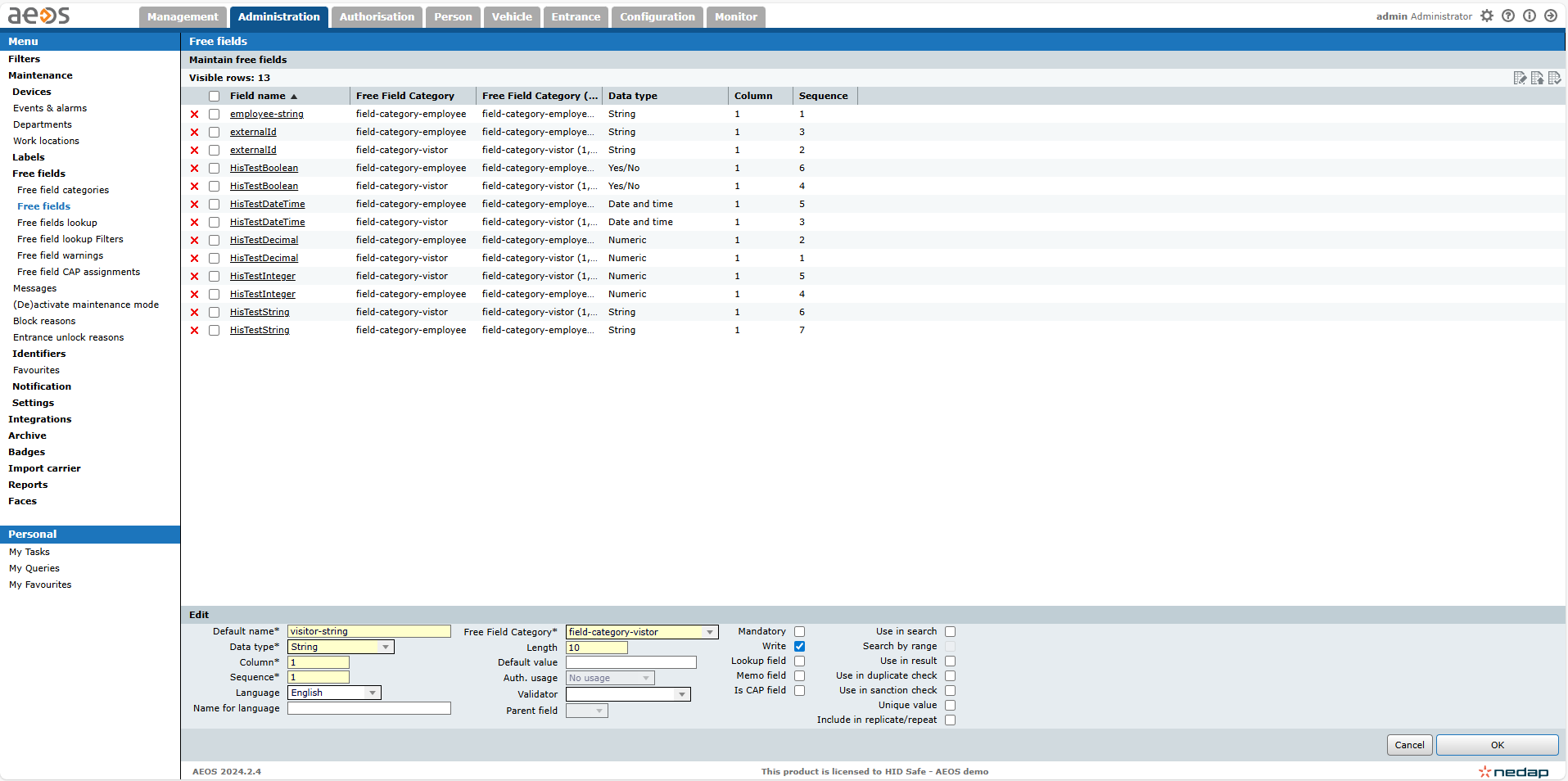
Assignment:
Read/Write to Visitor:
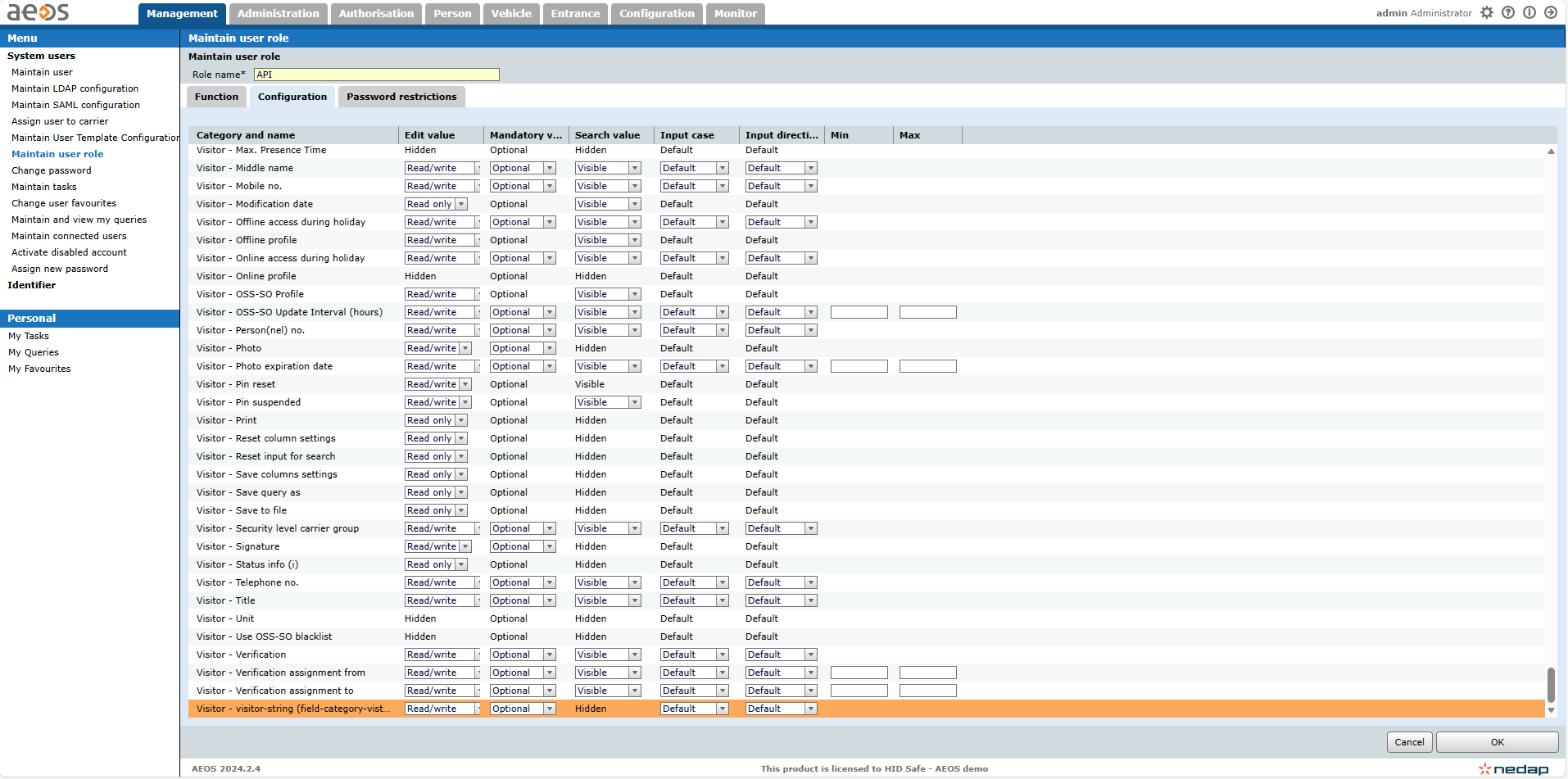
Read Only to Person:
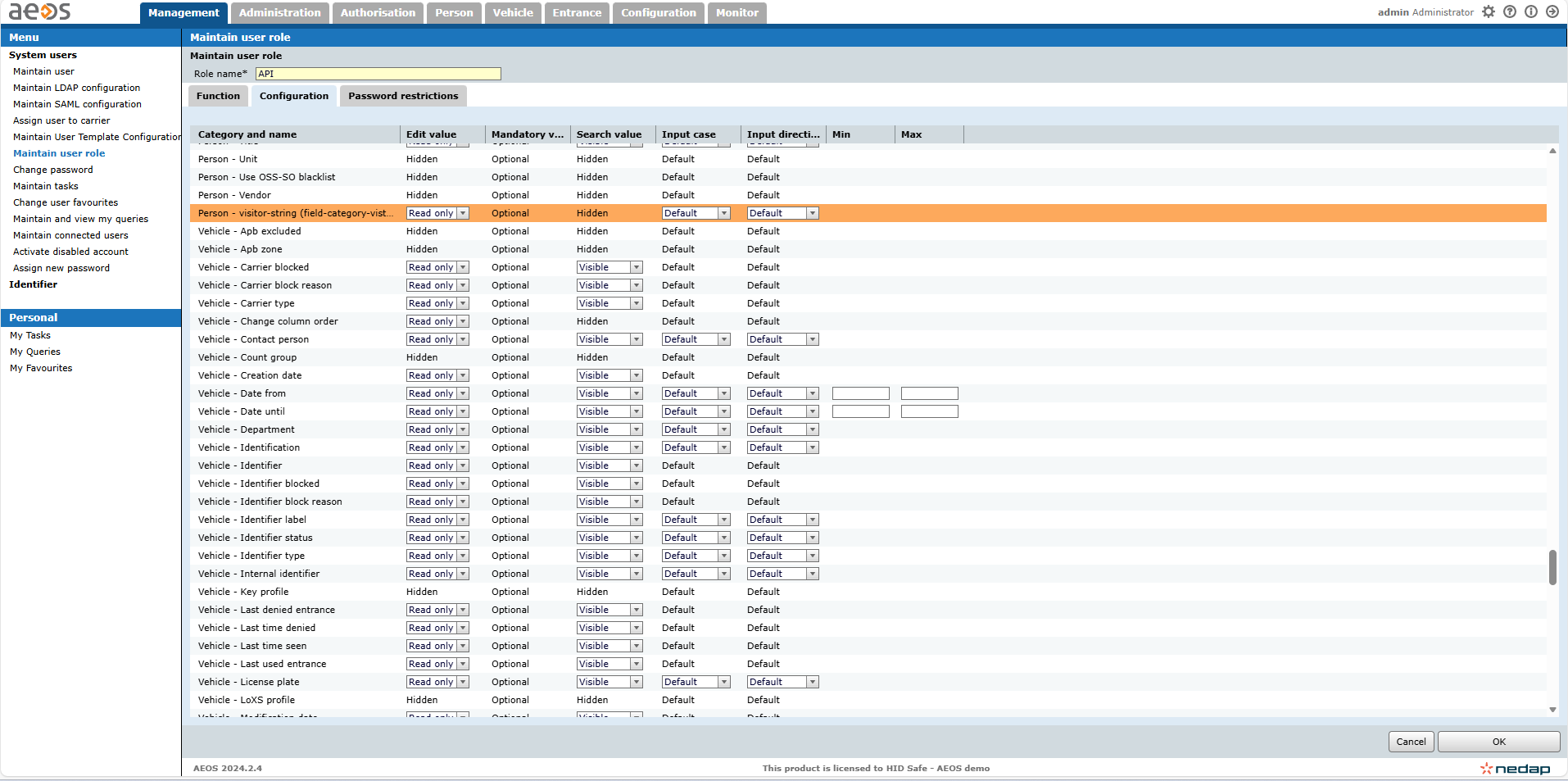
Miscellaneous
Credential Model
A credential in AEOS is uniquely identified by:
Card Number + Identifier Type (Format)
Implication
-
The same card number may exist in different formats
-
Both values are required for correct identification
Identifier Types
Identifier Types (Card Formats):
-
Must exist in AEOS before use
-
Are not created by the agent
Examples:
-
MIFARE
-
DESFire
-
Wiegand
Events
-
Event forwarding depends on configuration
-
When enabled:
-
AEOS events are sent to HIS
-