
Prerequisites
-
C•CURE 9000 instance, with the following attributes properly configured in the Victor Web Service:
-
UserName; this can be your system account created during PACS installation or newly created API user - see steps below -
Password; -
ClientNameand -
ClientID(These values will be required as part of the agent configuration.)
-
-
API version: Victor Web Service 2 or later.
Configuration
PACS Configuration
Step 1: Create a New API User in CCure Administration Station
-
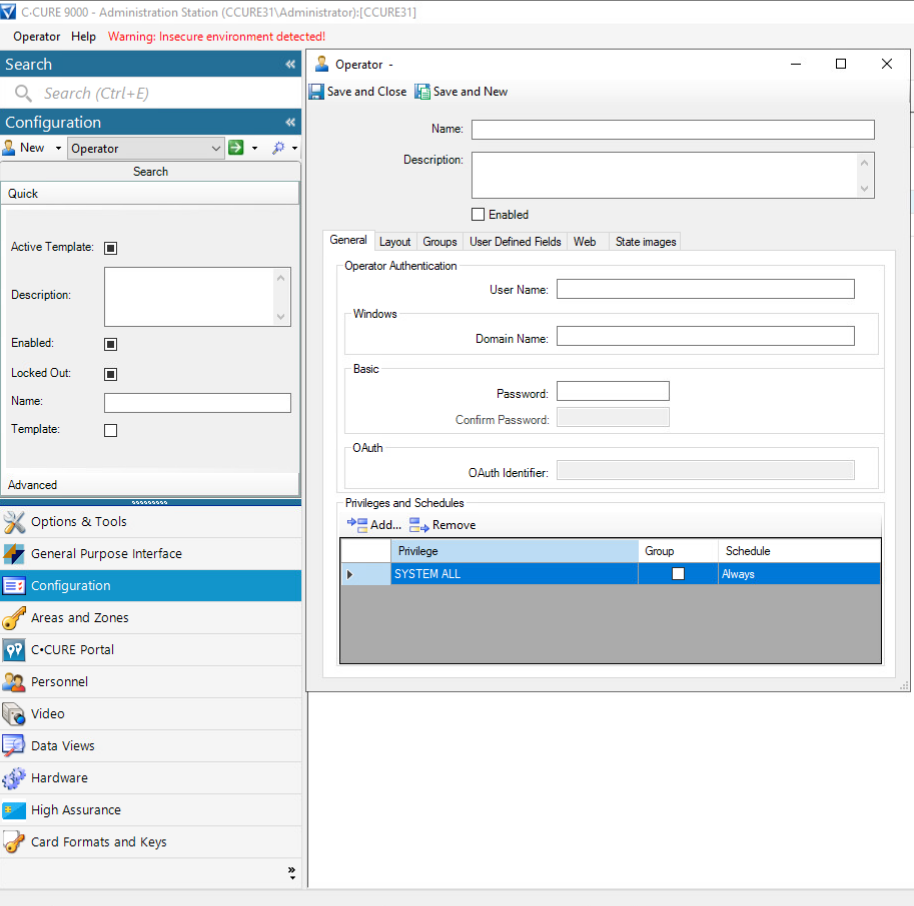
Click “Configuration” in bottom left panel
-
Select “Operator” in middle configuration section
-
Click “New” next to operator
Step 2: Enter API User Credentials
-
In section General → Operator Authentication enter following:
-
User Name, Password and Confirm Password
-
Make sure “Enabled” on top is checked
-
-
Click “Save and Close” button
Step 3: Verify
-
You should now be able to login to Administration Station and API using this newly created user.
Agent Configuration
General agent startup
Step 1: Download
To obtain the pacs-agent_{pacs-name} Docker image, follow the HID Agent Administration Guide for End-Customer.
Step 2: Create environment
Create a file named .env with the following content:
Agent__TenantId=example-tenant-id
Agent__PacsId=example-pacs-id
Auth__ClientId=your-client-id
Auth__ClientSecret=your-client-secret
In case you are connecting to a different environment than HID production, you need to set the proper URLs:
Auth__AuthNProvider=https://auth.example.com
Agent__PlatformUrl=https://platform.example.com
-
Adjust all file parameters according to your setup.
-
It is recommended to store this configuration on an encrypted drive or delete
.envfile as soon as the Docker image is executed.
Step 3: Run Docker image
docker run -d \
  --env-file .env \
  pacs-agent-{pacs-name}:latest
Step 4: Check that the Docker image is running
docker ps
Environment variables description
Related to HIS
-
Agent__PlatformUrl: HID Integration Service URL (https://his.hidglobal.com/ais/v1).-
This information is provided by HID. By default, this is set automatically to the production environment value and does not need to be set manually in most cases.
-
-
Agent__TenantId: Tenant ID within HID Integration Service.-
This information is provided by HID.
-
-
Agent__PacsId: Unique ID assigned to the agent during registration.-
This information is provided by HID.
-
If you registered your PACS on your own, this would be the
IDyou gave to the PACS.
-
Related to HID Authentication Service
-
Auth__AuthNProvider: HID Authentication Service URL (https://auth-us.api.hidglobal.com/idp/t89d23e0b2445510399335/authn).-
This information is provided by HID. By default, this is set automatically to the production environment value and does not need to be set manually in most cases.
-
-
Auth__ClientId: Client ID obtained during registration.-
This information is provided by HID.
-
-
Auth__ClientSecret: Client secret obtained during registration.-
This information is provided by HID.
-
Don't forget to replace the {pacs-name} placeholders with the actual name of the pact agent.
Agent-specific configuration
{pacs-name} = ccure
Environment variables for C•Cure 9000 Agent:
-
CCure__Url: URL of the Victor Web Service.
The following attributes correspond to the attributes listed in the prerequisites.
-
CCure__UserName: Theusernameused to authenticate with the Victor Web Service. -
CCure__Password: The correspondingpasswordfor the aboveusername. -
CCure__ClientName: The name of the client that is used to log in. -
CCure__ClientId: The ID of the client that is used to log in.
Agent-specific .env file part example:
CCure__Url=http://localhost:8090
CCure__UserName=username
CCure__Password=password
CCure__ClientName=client-name
CCure__ClientId=client-id
Limitations
Unsupported operations
HIS has functionality for first-factor PIN credentials. This functionality is not available in CCure and is therefore not supported. Any attempt to invoke the PIN functionality, even through imports, will result in an unsupported operation error. Please consider using a second-factor PIN instead, via the credential extension fields.
Missing the Events Writing to the PACS feature.
Limited operation
CCure supports only a single credential. If you include more than one in the import request, it will result in the OperationNotSupportedException. If you want to replace the existing credential, set the removeUnlisted parameter to true.
When the HIS CCure Agent broadcasts any update or delete operation to CCure (e.g., visitor checkout, cardholder removal, credential deactivation), the corresponding record must not be open in the CCure UI at that moment. Ensure the target record is closed in the CCure application before triggering the operation in AIS.
All extension fields are removed from the event data to prevent any leakage of PII.
See the changelog for details on versions and updates.
Creation of extension fields
HIS supports custom extension fields:
-
Register these custom fields at both the tenant and agent (PACS) levels through the AIS; this process is documented here.
-
Configure these fields within C•CURE 9000 Administration Station:
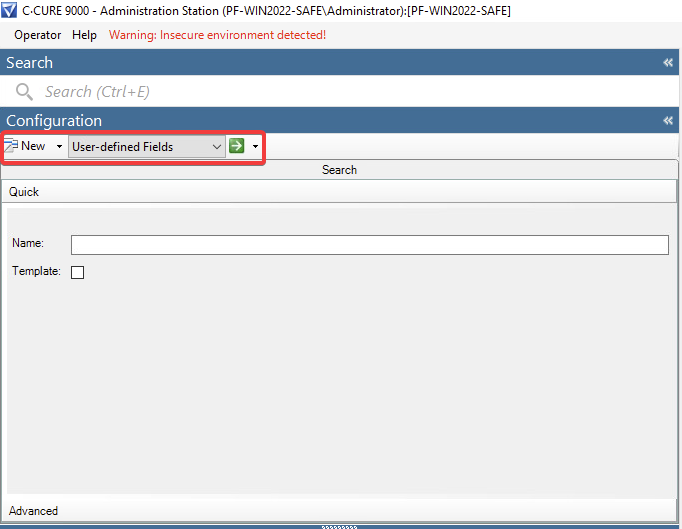
Keep the following in mind:
-
Naming differences: Identity and Visit in HIS both map to a Personnel in C•CURE 9000.
-
Field type: You can always use the
Charactertype when adding extension fields.
HIS will handle any necessary type marshalling automatically. If, for some reason, you need to use the native type of a CCure extension field (for example, mapping an HIS int to a CCure int), you can do so. However, be aware that during development, we encountered some unexpected behavior, such as weird database errors when using certain native types like int for CCure extension fields.
When listing visitors, we need to distinguish between those who are checked in and those who are not.
We explicitly set the Int9 field during the check-in (1) and check-out (0).
This means that the Int9 field of the Personnel object is reserved for HIS, and you should not use it.