
Prerequisites
-
You should have received the following credentials:
-
hostname(usuallysecuresftp.preprod.his.hidcloud.com) -
username -
A private
.pemor.ppkcertificate (store this file securely, as it serves as your authentication method).
-
-
You must have network access to the AWS cloud.
-
Please note that access to specific deliverables is based on the licensing model.
Download steps
-
Download and install WinSCP.
-
Open WinSCP.
-
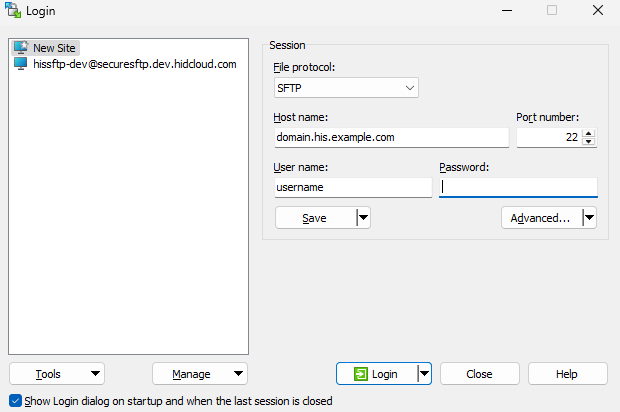
Click "New Site":
-
Enter the following connection details:
-
File protocol: SFTP
-
Host name: the service hostname provided by HID
-
Username: the username provided by HID
-
Port number: leave as 22
-
-
Go to Advanced → SSH → Authentication.
-
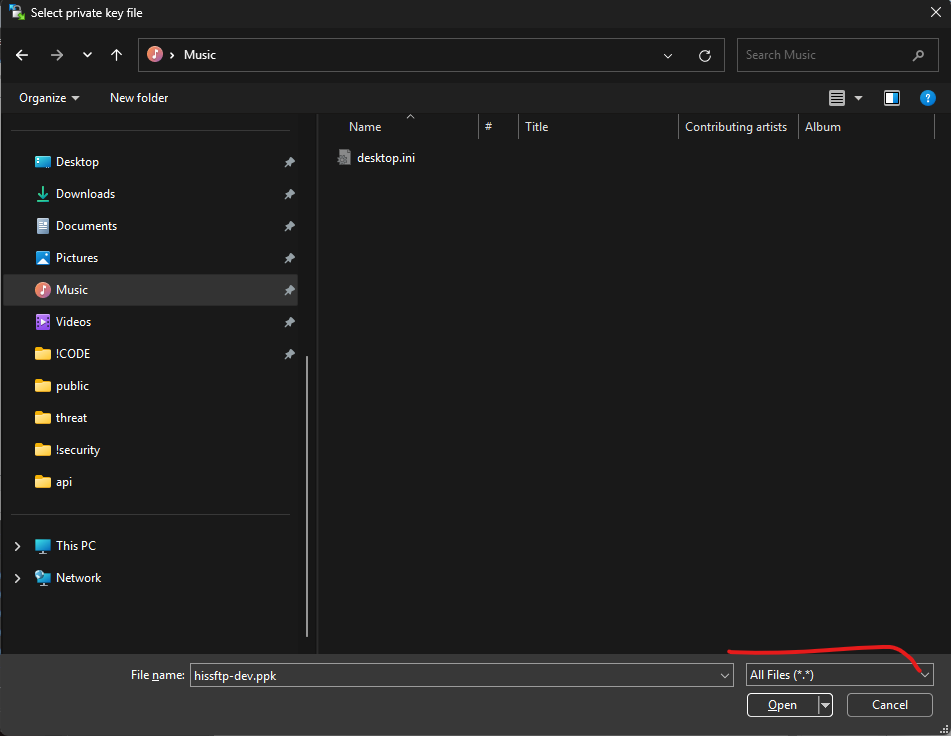
Click "…" next to Private key file.
-
Locate your
.pemor.ppkfile. You may need to change the file filter to All Files (.) to view.pemfiles.
-
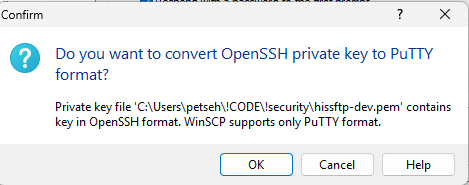
If prompted, click Yes to convert the
.pemfile, the OpenSSH private key, to PuTTY format. This step is not required for the.ppkformat.
-
Save the newly generated
.ppkfile in a secure location and ensure it is inaccessible to others. -
Click OK to get back to the login screen.
-
Click Login to connect to the file repository.
-
Once connected, you will see a folder containing the deliverables. Select the files you need and press
F5to download them.
These deliverables are intended solely for use as defined in the license agreement. Any unauthorized usage, including sharing with third parties, may result in legal action.